Table Of Contents
1) Internet Connection Not Needed
2) Up To 10 Players
3) Specific Or Random/Unknown Cards
4) Equity/Win/Tie %age's
5) Hand Type Stats
6)
Equity
7) %age's Or n:1 Odds
8) Generate Random Player And Board Cards
9) Fold/Un-Fold Players
10) Dead Cards
11) Setting For Number Of Random Monte Carlo Simulation Trials
12) Undo
13) Shortcuts
* Hand Type Stats
* Flop Hit Stats
* Odds For Flopping Draws And Combination Draws
* OnePair Breakdown Stats
================================================================================
================================================================================
Hand Ranges Features: (Mac-Expert
Version)
Stats Features: (Mac-Expert
Version)
General Features: (Mac-Expert
Version)
Note On Tutorial's Screenshots
This Tutorial explains
PokerCruncher's
features and shows you how to use PokerCruncher to
improve
your game by:
- Thinking in terms of hand
ranges, not just specific
hands or random hands.
- Understanding flop odds/equity,
in addition to the usual river
odds/equity.
- Using advanced techniques like flop
texture analysis.
- And more.
PokerCruncher is an
advanced Texas
Hold'em odds/equity calculator that supports:
- Fully General Hand Ranges
- Deal-To-Flop and Flop Texture Analysis
- Many Stats: hand type stats, flop hit stats, odds for flopping
draws and combination draws, OnePair breakdown stats
- Range Equity Heat Maps And Hand Combo Stats
- Save/load and export/import scenarios (hands) and hand ranges
(import scenarios feature: iOS and Mac-Expert versions)
- And more.
And the
Mac-Expert version of
PokerCruncher has many
additional,
expert-level features.
Few odds/equity calculators have these powerful features at the level
of PokerCruncher. But with all of these powerful features it may be
hard to see where to start to use PokerCruncher effectively; this is
the goal of this Tutorial.
PokerCruncher is a powerful
poker
odds/equity study and analysis tool for
improving
your game. You can of course use it however you'd like, but
it's not meant to be used in real-time in the middle of a
live
casino hand.
Internet play is different;
you should be able to use PokerCruncher effectively in internet hands,
especially the
Mac-Expert
version of PokerCruncher. For example you can create a
library
of useful hand ranges for different styles of players and for
different positions, and with PokerCruncher running side by side you
can quickly put your opponents on hand ranges and calculate.
As a
study and analysis tool,
here's how you can use PokerCruncher to improve your
odds/equity
knowledge and
decision
making process:
- Review key hands you've
played to analyze the odds/equity each step of the way, to see if
you made the right decisions and how you could have played better.
Discuss your big hands and
strategies with friends or on forums. PokerCruncher's save/load
and export/import
features let you save key hands (scenarios) for future review and
share scenarios and hand ranges with others (import scenarios
feature: iOS and Mac-Expert versions).
- Set up and analyze realistic "what
if" and test scenarios you may encounter in the future.
- Analyze and test yourself on random
scenarios (use the "Rnd"
button to generate random player and board cards).
- Analyze specific hand vs. hand
range scenarios, and hand
range vs. hand range scenarios. Poker is a game of incomplete
information; you don't know your opponents' cards, so
being able to estimate your equity against a range of hands is
very important.
- Analyze flop odds/equity,
in addition to the usual river
odds/equity. PokerCruncher's Deal-To-Flop
and Flop Texture Analysis features let you do this. These
features also give you many
stats - hand type stats, flop hit stats, odds for
flopping draws and combination draws, OnePair breakdown stats.
The below sections explain how to use PokerCruncher's powerful
features to do the above things, using
real-life
hand situations as motivating examples.
1) Internet Connection Not Needed
2) Up To 10 Players
3) Specific Or Random/Unknown Cards
4) Equity/Win/Tie %age's
5) Hand Type Stats
First note that PokerCruncher does all of its calculation locally on
your device/machine so
an internet
connection is not needed.
You can enter up to
10 players.
You can enter
specific cards
for the players and the board, or you can leave some cards
blank,
which means
random/unknown cards.
(You can also enter
hand ranges;
that's an advanced feature that we'll cover later, below.) This is
useful e.g. for
reviewing hands
you've played where in retrospect you know your opponents' cards, or
for analyzing
"what if" scenarios.
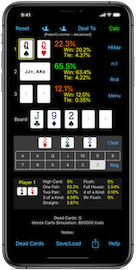
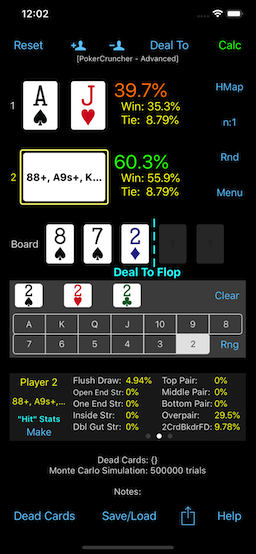
For example consider the below 3-player specific scenario.
JTs
has flopped an open end straight draw and a backdoor flush draw
against overpairs
AA and
KK.
As you can see,
JT's Equity
is about
38%, and the
Stats
view shows how often
JTs
will make a
Straight,
Flush,
OnePair,
TwoPair,
etc. by the river.
Positive equities (10% or more
above breakeven equity) are colored
green;
negative equities (10% or more
below breakeven equity) are colored
red
(actually,
orange);
breakeven
equities are colored
yellow.
Also consider the below 10-player random scenario: AA vs. 9 random
hands.
AA's Equity is about
31%.
In addition to
each player's hand
type stats (tap/select the player to view the player's stats
in the
Stats view),
PokerCruncher can also show the
winning
hand's hand type stats (tap/select the board). (Android
version: use the "P" <-- and --> buttons in the Stats view to
select the player.) For example you can use the winning hand's stats
feature to see what the expected best hand is for example if 3 players
with random hands go to the river.
--------------------------------------------------------------------------------
Example: Basic Calculation:
3 Players With Specific Cards,
And A Specific Flop:
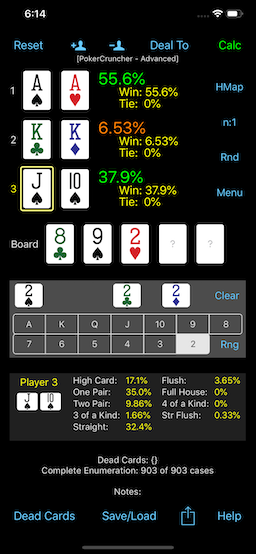 |
Example: Basic Calculation:
AA vs. 9 Random Hands,
Preflop:
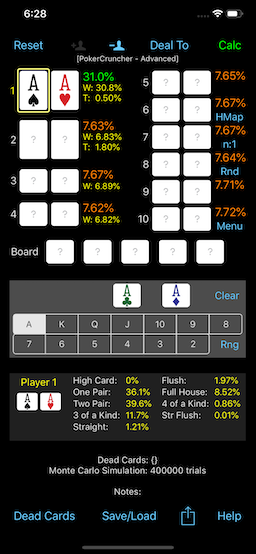 |
6) Equity
Equity is a player's
%age
ownership of the pot (or of the situation/scenario). It's the
sum of the player's Win %age and the fractional ownerships of the pot
that the player has in ties with other players.
Equity's add up to
100% but
Win %age's usually don't (because of ties). Most people usually think
about Win %age, but
Equity is
really the more important stat.
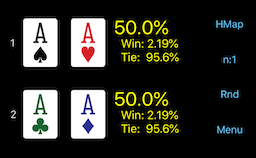
Consider the below example: AA vs. AA. Win %age for both hands is only
about
2.2% (when they make a
flush using a single Ace). But the hands tie about
95.6%
of the time and each hand's Equity is
50%.
The
50% Equity %age describes
the even nature of this matchup much better than the
2.2%
Win %age. This example is extreme, but similarly in general,
Equity
is the better stat to think about.
--------------------------------------------------------------------------------
Example: Equity: AA vs. AA:
7) %age's Or n:1 Odds
PokerCruncher can show stats as
%age's
or as
n:1 odds (
against).
"n:1F" means odds
"in
favor". The
"n:1" ("%")
button toggles between the two.
--------------------------------------------------------------------------------
Example: %age's:
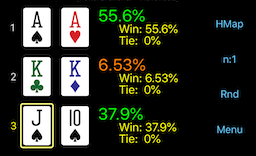 |
Example: n:1 Odds:
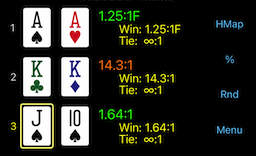 |
8) Generate Random Player And Board Cards
The
"Rnd" button assigns
random player and board cards.
- If you tap/select a player
card/range field, the "Rnd" button assigns random cards
to all players that you haven't assigned cards to. So for example
you can enter specific cards for Player 1 (you) and tap the "Rnd"
button to generate random cards for the other players.
- If you tap/select a flop/turn/river
card, the "Rnd" button generates a random
flop/turn/river. In addition, if you tap/select a flop
card, a new submenu
"Random Flop" appears in the Menu ("Menu"
button), which you can use to generate more specific
kinds of random flops like: broadway/medium/low
flop, suited flop,
paired flop. (Mac-Expert
version: the "Random Flop" pulldown menu button is to the right of
the "Rnd" button, when a flop/turn/river card is tapped/selected.)
Additionally, you can assign random cards to just
one
specific player by
long-tapping
one of the player's card fields (which brings up the
player's
shortcut menu) and then tapping the
"Deal
Random Cards" button. (Mac-Expert version:
SHIFT+<Rnd> button.)
You can use this feature to generate random
what-if
and test scenarios and test your odds/equity estimates
against PokerCruncher at each street: preflop, and after a random
flop, turn, and river.
9) Fold/Un-Fold Players
You can use the
"Fold Selected
Player" button in the Menu to fold a player out of the hand,
and the
"Un-Fold Selected Player"
button to put a player back into the hand. (Mac-Expert
version: click "Fold" / "UnF" button.)
10) Dead Cards
You can enter
dead cards: tap
Menu --> Dead Cards, Settings, Undo --> Set Deck Card Dead/Live
button, then tap a deck card to mark it dead/live. (Mac-Expert
version: click "Set Dead Card Dead/Live" button, then click a deck
card.)
11) Setting For Number Of Random Monte Carlo Simulation Trials
PokerCruncher has a
setting
(Menu --> Dead Cards, Settings, Undo --> Number Of Sim. Trials)
for the
number of random trials
to do for
Monte Carlo simulation.
Note that there's an
Infinite
setting. For any setting, you can
stop/continue
the calculation.
(Mac-Expert version: Click the
"Stop"
button after a few seconds when the stats stabilize, or use
the
"Auto-Stop" checkbox setting,
which automatically stops Monte Carlo calculation, and is
configurable.)
12) Undo
PokerCruncher has an
undo feature
for recovering hand ranges that you
accidentally
cleared out in the main screen (Menu --> Dead Cards,
Settings, Undo --> Import Last Cleared Range (Undo); select (tap) a
player first).
(Mac-Expert version: "Edit" menu --> "Undo/Redo Hand Range Edit (1
level)".)
13) Shortcuts
- Double-tap a player's
card/range field to bring up the Hand
Range Editor screen. (iPhone and Android versions; is not
needed for iPad and Mac-Expert versions)
- Long-tap a player's
card/range field to bring up the player's
shortcut menu. This menu lets you do some important
operations faster e.g. fold/un-fold
a player, load a saved hand
range onto a player (without having to open the Hand
Range Editor screen). (iPhone, iPad, and Android versions)
Poker is a game of
incomplete
information; we need to think in terms of
ranges
of hands, not just
specific
hands or
random hands.
PokerCruncher's
fully general hand
ranges feature lets us do this, and this feature is where
PokerCruncher starts to separate itself from many other odds/equity
calculators.
Real-Life Hand Situation: How to play QQ (or JJ) preflop when
facing a re-raise?:
Let's look at a simple preflop situation that's very common - we call
it the
QQ (or JJ) dilemma.
This example illustrates why
QQ
(or
JJ) can be a difficult
hand to play. You're in a
2/5
no-limit cash game and you have a
500
stack. You're in early position with
QQ
and you raise to
20. A solid
tight-aggressive player on your left (also with a
500
stack) 3-bets you to
60.
Everyone folds, and you 4-bet to
200,
thinking your
QQ is probably
the best hand and since you're out of position (this may not be a
smart play on your part, it may be better to call, or fold, but we'll
say you 4-bet). (Also, this is pretty large bet-sizing at each step in
this example; we wanted to reach all-in pretty fast in this example.)
Your opponent goes all-in for
500.
It's
300 for you to call his
all-in.
Should you call his all-in?
It all depends on how this opponent plays of course. If he only makes
this play with
AA or
KK,
then you should
fold, because
it's 300 to you to win 707 (your opponent's 500 + your 200 + the
blinds = 707; we'll ignore the rake here), so you're getting about 7:3
pot odds for the call, but you're a 4:1 underdog (your
QQ
has about 20% Equity against
AA
or
KK, as a basic specific
hand vs. specific hand calculation in PokerCruncher will show), so you
don't have enough pot odds to make the call.
But let's say this opponent loves to make this play with
AK
too. Now the situation is more complicated. Here's how you can analyze
this situation in PokerCruncher using
hand
ranges:
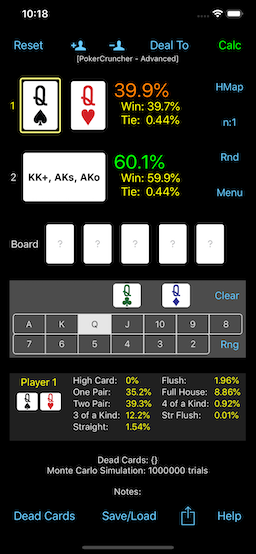
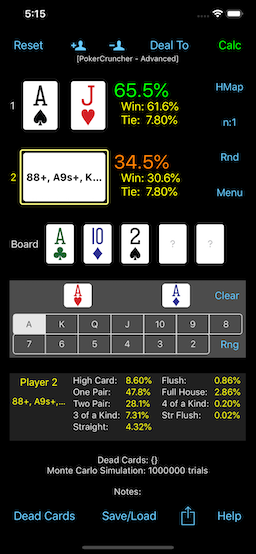
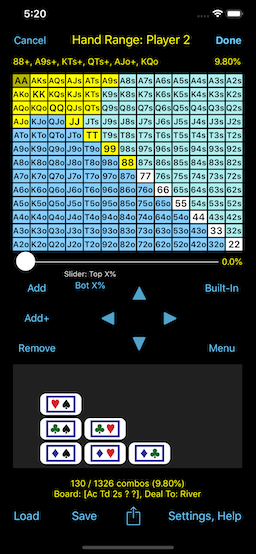
- Player 1 (you): Enter specific cards QQ
(suits don't matter in this example).
- Player 2 (opponent): Enter hand
range {KK+, AKs, AKo}. To enter a hand range, select
(tap) a player's field and tap the "Rng"
button, or just double-tap
a player's field (iPhone and Android versions). (iPad and
Mac-Expert versions: single-tap/click a player's field in the main
view to select the player; the Range Editor view then lets you
edit the selected player's hand range.) "KK+" means "KK or better"
i.e. KK or AA. "AKs" means AK-suited. "AKo" means AK-offsuit.
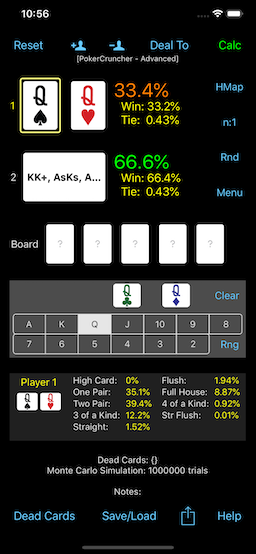
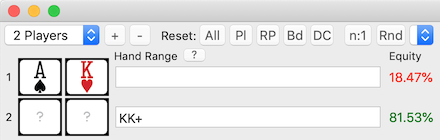
- Calculate. You see that your Equity with QQ is about 40%.
This is pretty decent, not too much less than 50%. You may have
thought your Equity would be lower than this because you're a big
underdog against AA and KK (80:20 underdog), and you're only a 57:43
favorite against AK (only a little better than a coin flip). But there
are
16 hand combos for AK (4
combos for AKs, 12 combos for AKo), and only
6
hand combos for AA and KK each, so your opponent will have AK
more often (
16 hand combos)
than AA and KK combined (
12 hand
combos). Be sure that any hand ranges odds/equity calculator
you use takes this number of hand combos factor into account
correctly.
Back to your decision - you're getting about 7:3 pot odds for the call
(you need to call 300 to win 707), so you need more than about 30%
Equity. You have about 40% Equity, so this is a profitable call.
Best
decision: call (if the hand range {KK+, AKs, AKo} for your
opponent is accurate of course).
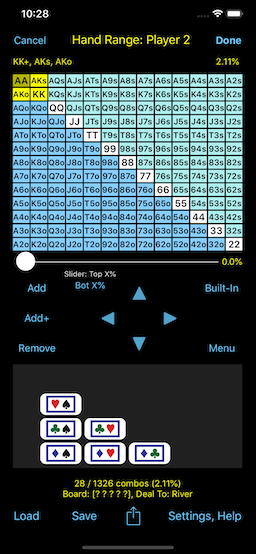
The below screenshots show this example situation.
--------------------------------------------------------------------------------
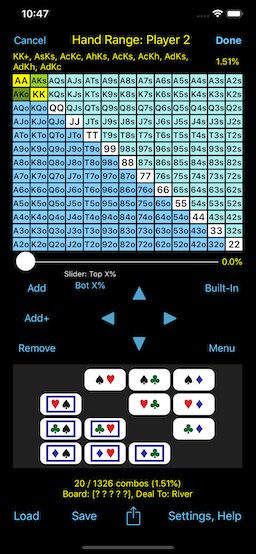
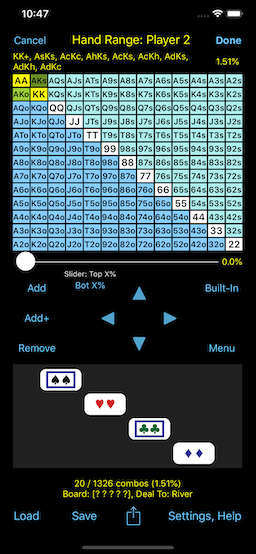
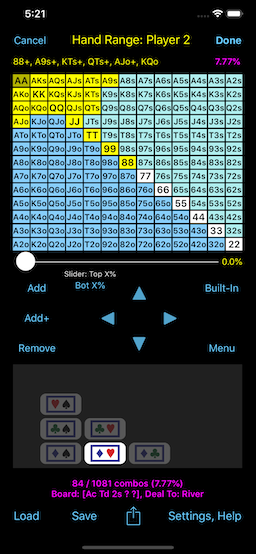
Example Situation: QQ vs. Hand Range {KK+, AKs, AKo}, Preflop:
2nd screenshot: AA
cell is selected
"Test Around" The Situation
But don't just stop here; continue analyzing this situation by
"testing
around" this situation. So you've figured out that QQ is a
call in this situation against this opponent's hand range. How weak a
hand would you need to have in order to fold? JJ? TT? 99? Etc. Plug in
these hands instead of QQ and see how your Equity changes. Maybe you'd
need a hand as weak as AQ, AJ, AT, etc.? Also plug in these hands and
see what your Equity is for these cases. Try to find the tipping /
breakeven point.
Similarly, test around this opponent's hand range {KK+, AKs, AKo}.
This is a pretty tight range; how does your Equity change if we add
e.g. QQ and JJ to his range? Or if we add AQ? Or if we add some
suited connectors like 87s? Or suited hands like A3s (if this opponent
is capable of making this kind of bluff with his Ace blocker card)?
Again try to find the tipping / breakeven point.
This kind of testing around and practice will give you a "feel" for
hand range Equities over time, which will help your live play
decisions greatly.
In the
QQ vs. {KK+, AKs, AKo}
example above, we noted that there are
16
hand combos for AK (4 combos for AKs and 12 combos for AKo),
and
12 hand combos for KK+ (6
combos for AA and 6 combos for KK). So in the hand range we
constructed above, AK has more hand combos than KK+. This
default/full
hand weighting helps QQ's Equity (
40%)
in this example, because it's up against AK more often than it's up
against KK+.
But what if our opponent doesn't always play AK this way. What if he
plays AK this way about
half the
time? We can use PokerCruncher's
Hand
Combos view to model
this
custom hand weighting:
- Player 2 (opponent): Enter hand
range {KK+, AKs, AKo}, as in the above example.
- Tap the AKo grid cell
to select it.
- Tap the "Combos" button
to bring up the Hand Combos view.
Note that by default the full set of hand combos are turned ON (12).
(iPhone X, Mac-Expert versions: the Hand Combos view is always
shown so no need for a "Combos" button.)
- In the Hand Combos view, turn OFF half
(6) of the hand combos by
tapping on each of them. We'll remove the 6 hand combos in the top
triangle. Since flush draws
aren't involved in our scenario here, the specific suits of the
hand combos don't matter. NOTE:
If flush draws are involved (even backdoor flush draws), then
suits most certainly matter, and we have to be very careful which
specific hand combos we turn OFF/ON w.r.t. suits.
- Tap the AKs grid cell
to select it. Then as in the previous step, in the Hand Combos
view, turn OFF half (2
of the 4) of the hand
combos; we'll remove the 2nd and 4th ones. Again, since flush
draws aren't involved in our scenario here, the specific
suits of the hand combos don't matter. The "NOTE:"
in the previous step above applies here too of course.
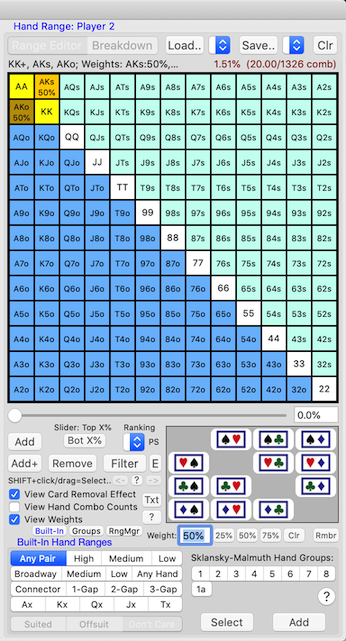
- Calculate. You see that QQ's Equity is now 33%
(vs. 40% originally).
So cutting AK's
weight in
half
reduced QQ's Equity from
40%
to
33%. This is a significant
change in Equity which may affect your decision.
--------------------------------------------------------------------------------
Example: Custom Hand Combos (Weights) For AKo And AKs:
1st screenshot: AKo
cell is selected
2nd screenshot: AKs
cell is selected
Here's another useful application of the
Hand
Combos view mentioned in the
Hand
Combos (Weights) In Hand Ranges section above. You can use this
view to control the
suits of the
hand combos you wish to add to the hand range.
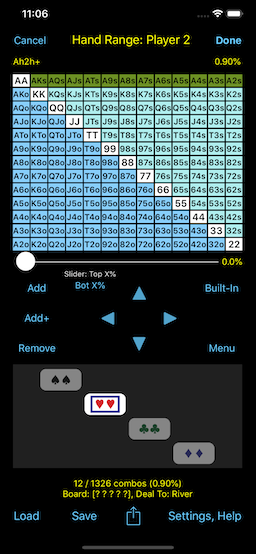
For example you can enter the hand range
Ahxh
(h = Heart) instead of the more general suited range
Axs
(s = suited), for example if the flop has exactly two Hearts and you
want to put a player on the (Heart) nut flush draw. You can select any
combination of suits. The below screenshot shows how you would select
Ahxh (h = Heart).
Multi-select
the range of cells AKs .. A2s by
swiping
across these cells on the range grid, then turn ON only the
hh
button in the Hand Combos view. You can also multi-select
cells by using the
Built-In Hand
Ranges screen.
--------------------------------------------------------------------------------
Example: Select Suits In Hand Ranges (Ahxh (h = Heart)):
Screenshot: AKs-A2s
cells are selected
This slider selects the
top x% of
hands. PokerCruncher uses a standard hand ranking system (
PokerStove's):
hands are ranked according to
preflop
all-in equity versus 3 random hands. This hand ranking system
balances the value of
high cards
with the value of
drawing cards.
This %age, shown at the top right of the Hand Range Editor screen,
shows the %age of all possible hole-card hands that are in the hand
range (taking assigned and dead (non-live) cards into account if the
"View
Card Removal Effect" setting is ON). This is also the odds of
the player getting a hand in the hand range.
For example the range %age is
2.11%
in the
QQ vs. {KK+, AKs, AKo}
example in the
Fully General Hand
Ranges section above.
However it's
1.51% in the
Hand
Combos (Weights) In Hand Ranges section above (lower than
2.11%
because we removed some hand combos from the range).
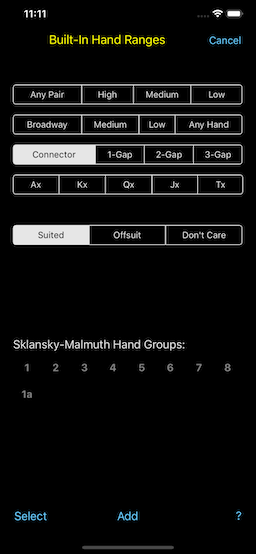
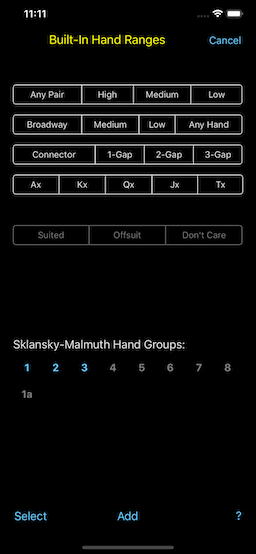
PokerCruncher has the following
built-in
hand ranges that you can use as building blocks:
- Pairs: any pair, high,
medium, low.
- Broadway, medium, low
cards.
- Connectors, also 1-gap,
2-gap, 3-gap.
- Ax, Kx, Qx, Jx, Tx.
- Suited/offsuit subsets
of the above built-in hand ranges.
Also:
- The 8 Sklansky-Malmuth Hand
Groups.
- Our own Group 1a (AA
and KK).
For example the below screenshots show how you would select all suited
connectors, and Sklansky-Malmuth Hand Groups 1..3.
--------------------------------------------------------------------------------
Example: Select All Suited Connectors, Sklansky-Malmuth Hand
Groups 1..3:
If you turn ON the
“Auto-Add/Remove
Grid Cells” setting in the Hand Range Editor screen
(Menu --> ...),
then grid cells are
added/removed
to/from the hand range as you
tap/swipe
them (else they're just
selected,
not added/removed).
(Mac-Expert version: this setting isn't needed because add/remove is
the default grid cell click behavior. To just select grid cells, do
SHIFT+click/drag.)
If you turn ON the
“View
Card Removal Effect” setting in the Hand Range
Editor screen (Menu --> ...),
card
removal effect is shown in the
range
%age (top right), in the
range's
hand combo count, and in the
Hand
Combos view.
(Mac-Expert version: this is a
checkbox
setting in the Range Editor view.)
Note that this setting shows
card
removal effect, but not
range
removal effect. So, if you want to assign a specific hand to
a player, assign the player
2
specific cards from the
card
deck; don't assign the player a (1-combo)
hand
range. This way, the player's hand will be in the scope of
the "View Card Removal Effect" setting.
Also note that calculation results take
both
card and range removal effects into account i.e.
all
removal effects (calculation results must take all removal
effects into account in order to be correct).
--------------------------------------------------------------------------------
Example: View Card Removal Effect
Example Scenario: AJo vs. Hand
Range {Top 10% Of Hands}, 1 Ace Card On The Board
Note: 2 Ace cards are
assigned/dead
"View Card Removal Effect" Setting Is **OFF**:
(AA cell is selected) |
"View Card Removal Effect" Setting Is **ON**:
(AA cell is selected) |
Range Equity Heat Maps And Hand Combo Stats
|
Back
To Top |
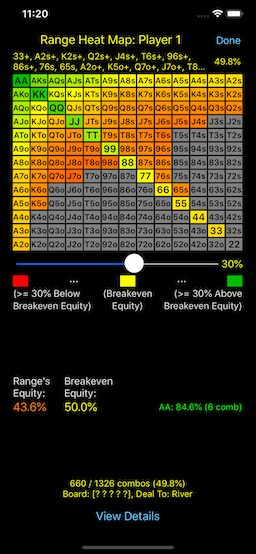
This feature lets you dig down into a range's overall equity and lets
you see the
equity of each hand in
the range so you can understand the range's
equity
breakdown.
The equity breakdown is shown using a color-coded
equity
heat map. Cells/hands that have
above-breakeven
equity are shown in
green-ish
color; cells/hands that have
below-breakeven
equity are shown in
red-ish
color; and cells/hands that have
around-breakeven
equity are shown in
yellow-ish
color.
The
color-spectrum-slider (1%
.. 50%) lets you adjust the
radius
(or
width, i.e. 2*radius) of
the red -> yellow -> green color spectrum (which is centered at
yellow).
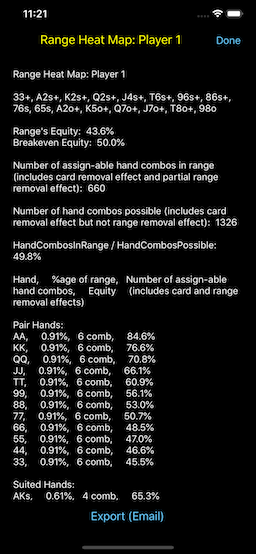
If you tap the
"View Details" button
you can see the specific
Equity
and
hand combo stats for each
cell and also a %age value for each cell that tells you what
%age
of the range the cell comprises (taking dead and already
assigned cards into account). You can also see the
number
of hand combos for each cell and for the entire range. Also,
a
sorted list of all hands is
shown at the bottom (sorted on Equity).
1) Note: Monte Carlo Simulation
Note that due to
Monte Carlo (random
sampling) simulation, each hand's (grid cell's) Equity has a
higher variance (margin of error) than the entire range's Equity. You
can set the
"Number Of Sim. Trials"
setting (
Menu
--> Dead Cards, Settings, Undo --> Number Of Sim. Trials)
to
2x or higher (or even
Infinite)
to get more accurate results.
2) Note: Complete Enumeration
If the scenario is simple enough, PokerCruncher computes the
exact
odds/equity and stats by doing
complete
enumeration of the possible cases. For example it does this
if all player and flop cards are specified (no random hands, no hand
ranges).
--------------------------------------------------------------------------------
Example: Top50%OfHands vs. Top25%OfHands:
Range Equity Heat Map And Hand Combo Stats For Player 1
(Top50%OfHands):
* Hand Type Stats
* Flop Hit Stats
* Odds For Flopping Draws And Combination Draws
* OnePair Breakdown Stats
Most odds/equity calculators can only deal to the
river.
But when we play e.g.
speculative
hands like JTs or 75s or even AK, especially for a preflop
raise, we'd like to know how often these hands can
flop
big made hands and draws. We're not necessarily playing these hands
for their river showdown value; we'd like to know how often they can
flop
big. PokerCruncher's
Deal-To-Flop
feature lets you do this. PokerCruncher also has
Deal-To-Turn
and
Deal-To-HoleCards.
Set
Deal-To = Flop, bring up
the
Stats view (the Stats
view is always shown on iPhone X), then tap the
"Hit"
button to switch to
flop
hit stats (must hit hand strongly using the hole cards), from
the default make hand stats. (iPad and Mac-Expert versions: use the
"Make
Hand" Stats vs.
"Hit Hand"
Stats selector in the Stats view.) For example flop hit stats
can tell you how often AK hits an Ace or King on the flop (OnePair),
or hits TwoPair or 3OfAKind on the flop. The default
make
hand stats are weaker, but are true to the textbook
definition of the stats. They include cases where the board's cards
are solely or mostly responsible for making the hand, e.g. for
OnePair, when the pair is on the board.
For
Deal-To = Flop, the Stats
view also shows
odds for flopping
draws and combination draws, and
OnePair
breakdown stats (TopPair, MiddlePair, BottomPair, OverPair).
Swipe left/right in the Stats
view
to see these stats (iOS
versions). (Android version: use the "S" <-- and --> buttons.)
Real-Life Hand Situation: How much do you want to pay to see the
flop with a speculative hand?:
You're in a 2/5 no-limit cash game and you have a 500 stack. A couple
of early position players limp. Say you limp in middle position with a
speculative hand like
JTs
(or 75s, etc., i.e. a suited/connected-type hand). A middle/late
position player raises to 30, and the two early limpers call.
Should
you call with JTs to see the flop?
Actually we can't answer this question because we haven't given nearly
enough information, for example:
- What are the stack sizes of the other players, and your stack
size, i.e. the effective stack size?
- What style of player is the preflop raiser?
- What implied odds does the preflop raiser (and the other
players) offer on his (their) entire stack? I.e. do these players
lose their entire stack easily (especially the preflop raiser)?
- How likely is it that the early position players limped/called
with monsters?
- What's your table image?
- What's the recent hand history and recent game flow at the
table?
- And much more ...
So currently we have limited information on your decision. But one
factor in your decision should be how often your speculative hand can
expect to flop a big made hand or a big draw. Knowing these odds will
help you figure out if the additional chips you need to call to see
the flop are worth it, especially in relation to your stack. The below
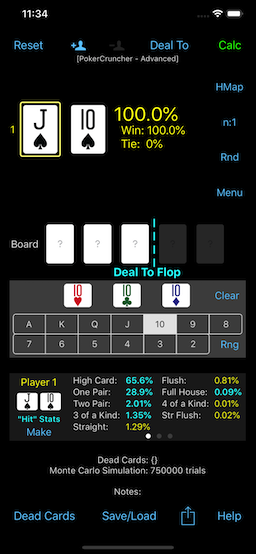
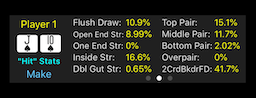
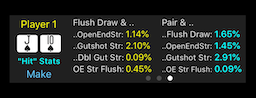
screenshots show these odds for
JTs
(assuming random hands for your opponents; if you want to be more
accurate, you can put your opponents on hand ranges).
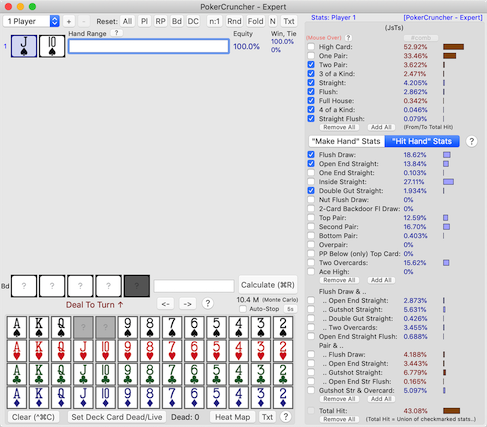
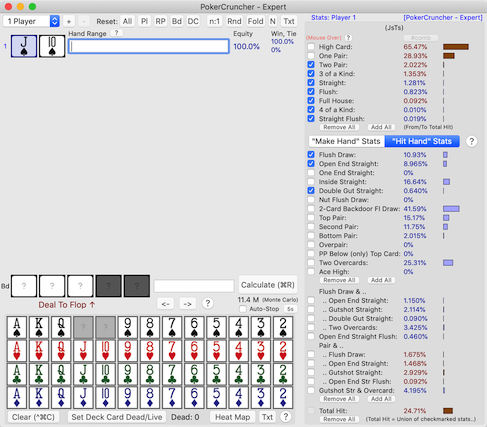
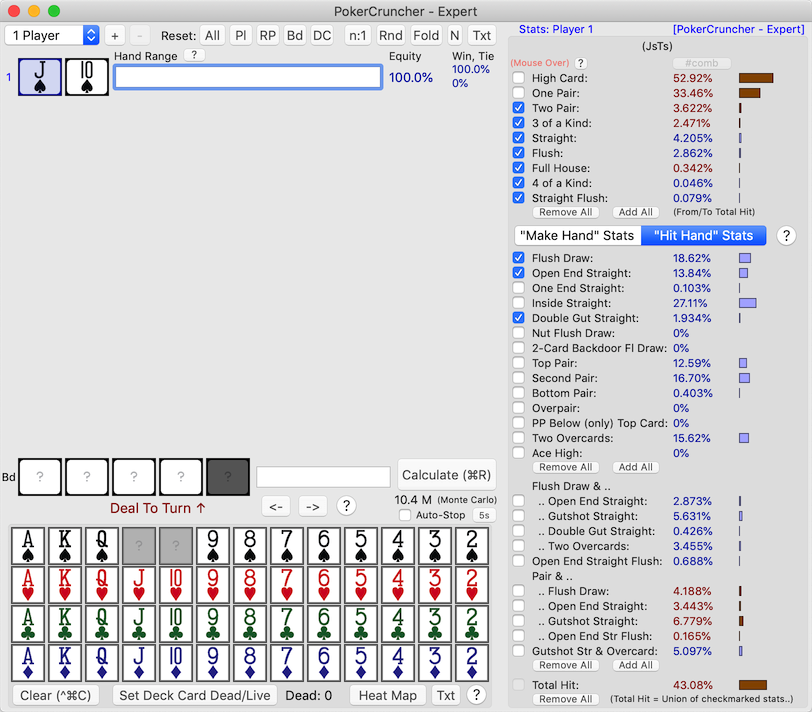
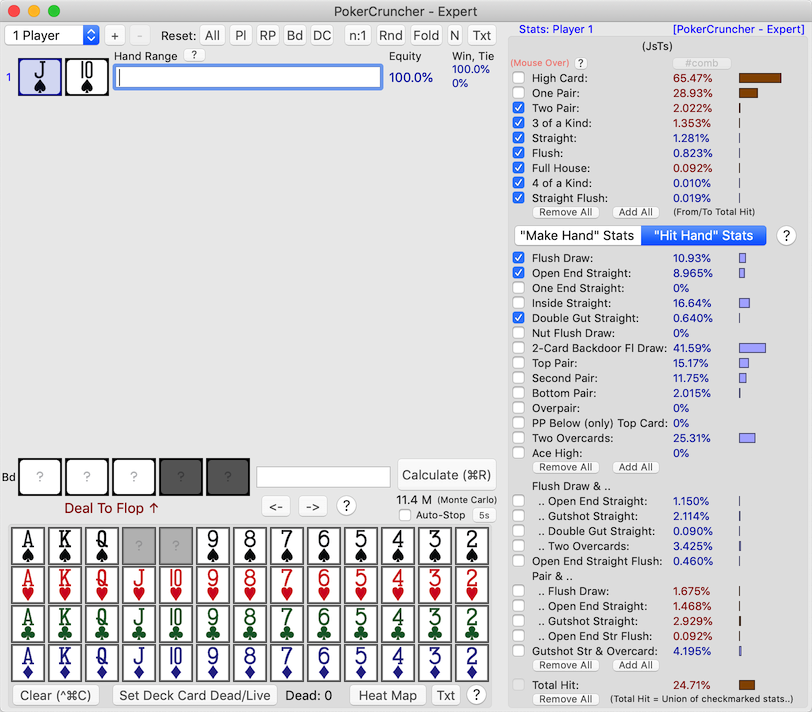
You can see that on the flop,
JTs
hits
OnePair about
27%
of the time, and hits
TopPair
about
14% of the time. It
hits
TwoPair about
2%
of the time, and hits
3OfAKind
about
1.4% of the time.
JTs
flops a
flush draw about
11%
of the time and flops an
open end
straight draw about
9%
of the time. Etc. Are these odds of flopping a strong hand or a strong
draw good enough for you to call the preflop raise?, also taking all
of the other considerations into account (stack sizes, player styles,
etc.)?
--------------------------------------------------------------------------------
Example: Deal-To-Flop Analysis For JTs, Many Flop Stats:
Hand Type Stats,
Flop Hit Stats:
 |
Odds For Flopping Draws,
OnePair Breakdown Stats:
Odds For Flopping Combination Draws:
 |
Real-Life Hand Situation: How can you tell if a specific flop hits
your opponent's range of hands hard?:
Any game, any player stacks. You have
AJo,
and say you put an opponent on a certain range of hands, e.g.
top
10% of hands (use the
range
%age slider to assign this range). Then a specific flop is
dealt, say it's
8s7s2d. You'd
like to know if this flop hits your opponent's range of hands, and how
hard it hits it, or if this flop misses your opponent's range of
hands.
Flop texture analysis
lets you do this.
Set
Deal-To = Flop. Assign a
hand range (say
top 10% of hands)
to your opponent and assign your cards (say
AJo).
Assign a particular flop (say
8s7s2d).
Bring up the
Stats view (the
Stats view is always shown on iPhone X), turn ON
flop
hit stats, tap on your opponent's hand range field to select
your opponent in the Stats view. Calculate. The Stats view shows how
this flop hits your opponent's hand range (
hand
type stats,
flop hit stats).
Swipe left/right in the Stats
view
to see
odds
for flopping draws and combination draws, and
OnePair
breakdown stats. (Android version: use the "S" <-- and
--> buttons.)
The below screenshots show the above example. Note that on the flop,
your opponent (
top 10% of hands)
hits
OnePair about
29%
of the time, hits
3OfAKind
about
3% of the time, and
hits a
flush draw about
5%
of the time. Note that since the
top
10% of hands range consists mostly of high cards, when this
range hits
OnePair on this
8s7s2d
flop, it will have an
OverPair
on the flop, as indicated by the healthy
29%
OverPair stat.
Of course, flop texture analysis also works if you assign specific
cards to your opponent. But the more common use case is to
see
how a hand range hits a particular flop.
--------------------------------------------------------------------------------
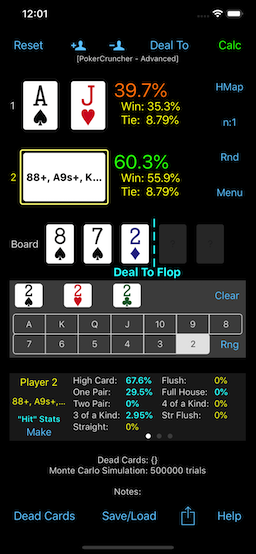
Example: Flop Texture Analysis: How Hand Range {Top 10% Of Hands}
Hits Flop 8s7s2d:
Hand Type Stats,
Flop Hit Stats:
|
Odds For Flopping Draws,
OnePair Breakdown Stats:
|
Save/Load And Export/Import Scenarios (Hands) And Hand
Ranges
|
Back
To Top |
Save/Load And Export/Import Scenarios (Hands)
You can
save scenarios (hands)
and
load them back in, using
Menu --> Save/Load Scenario --> ... (iOS and Android versions).
(Mac-Expert version: "File" menu --> ...)
You can also
export scenarios
to email and
import them back
in, using Menu --> Export/Import --> ... (import scenarios
feature: iOS and Mac-Expert versions).
(Mac-Expert version: "File" menu --> ... To export a scenario, do
"View Scenario Text/Notes, Export", then select all of the scenario's
text with the mouse and copy the text (Cmd-C), then paste the text in
email, etc.)
These features let you
save
key hands (scenarios) for
future
review, and
share
scenarios with friends or on online forums
.
Save/Load And Export/Import Hand Ranges
iOS And Android Versions
In the Hand Range Editor screen you can
save/load
and
export/import hand ranges
using Menu --> ... You can
save/load
up to
100 hand ranges
directly inside the app. Uses:
Range
Library,
Subranges,
Range Refinements.
Mac-Expert Version
In addition to save/load hand ranges as
.rng
files on your filesystem ("Save.." and "Load.." buttons in
the Range Editor view), you can
quick-save
and
quick-load up to
200
hand ranges directly inside the app (using the
quick-save/quick-load
pulldown buttons to the right of the "Save.." and "Load.."
buttons). Uses:
Range Library,
Subranges,
Range
Refinements.
To
export a hand range, copy
the hand range's text from a player's text field (or via the Range
Editor view's "Txt" button) and paste the text outside the app.
To
import a hand range, copy
the hand range's text from outside the app and paste the text in a
player's text field, <Return>.
Batch-Export / Batch-Import Saved Hand Ranges
In all versions of PokerCruncher (iOS, Android, and Mac-Expert), you
can
batch-export and
batch-import
your saved hand ranges.
iOS and Android versions: Hand Range Editor screen: Menu --> Range
Text, Export/Import --> "Export All Saved Ranges" and "Import Saved
Ranges ...".
Mac-Expert version: "File" menu --> "View Quick-Saved Hand Ranges
Text, Export/Back-Up" and "Import Quick-Saved Hand Ranges...".
You can use this export/import feature to
back
up / restore your hand range library,
transfer
your saved hand ranges from one device to another (or between the
other OS/device versions of PokerCruncher), and
share
your saved hand ranges with others.
You can
enter/edit text
notes on a scenario.
To
view and
edit
a
scenario's notes, in the
main screen, do Menu --> Scenario Text ... --> View Scenario
Text/Notes ... (iOS and Android versions).
(Mac-Expert version: click the “Txt” button at the top of the main
view
(left
hand side of the app's window), and then click the “Edit
Notes” button.)
Of course, notes are handled in
saved
scenarios and
exported/imported
scenarios.
For example, this feature lets us
record/save
important info. on our key hands in real time while it's
fresh in our mind, so we can
review/analyze
our key hands better later.
However note that PokerCruncher is primarily an odds/equity
calculation app, not a hand tracking / note-taking app. But we're
happy to add this minimal useful note-taking ability.
Monte Carlo Simulation, Complete Enumeration
|
Back
To Top |
PokerCruncher does
Monte Carlo
simulation: it generates hundreds of thousands or even
millions of random hands (trials) to converge on accurate odds/equity
and stats within seconds. There's a
setting
for the
number of random Monte Carlo
simulation trials to do (Menu --> Dead Cards, Settings,
Undo --> Number Of Sim. Trials), and there's even an
"Infinite"
setting (iOS and Android versions; Mac-Expert version: The
"Auto-Stop"
checkbox setting automatically stops Monte Carlo calculation
and is configurable).
However if the scenario is simple enough, PokerCruncher computes the
exact
odds/equity and stats by doing
complete
enumeration of the possible cases. For example it does this
for postflop scenarios with specific players' cards, which is a common
situation (for example the 3-player scenario in the first screenshot
in the
Basic Features section above).
For such scenarios only the turn and river cards are unspecified, a
small number of combinations (on the order of 1000), so PokerCruncher
simply enumerates all possible cards for the turn and river to compute
the exact answer, and it computes the answer very fast.
Answer Interesting And Challenging Odds/Equity Questions
|
Back
To Top |
This section is more technical than the others, but it's because
PokerCruncher is so powerful. Fasten your seat belts.
So far you've seen examples of some basic odds/equity questions that
PokerCruncher can answer:
Some Basic Odds/Equity Questions
- Specific hands vs. specific hands preflop, e.g. AA vs. KK
preflop.
- Specific hands vs. specific hands on the flop, e.g. the 3-player
scenario in the first screenshot in the Basic
Features section above.
- Specific hands vs. random hands, e.g. the AA vs. 9 random hands
scenario in the second screenshot in the Basic
Features section above.
- How often specific hands make OnePair, TwoPair, etc. by the
river (hand type stats). For example how often a flush draw on the
flop makes a flush by the river, or how often an open end straight
draw on the flop makes a straight by the river.
Let's go deeper and see examples of some more-challenging odds/equity
questions that PokerCruncher can answer, using
primarily its
Deal-To-Flop
and
flop texture analysis and
flop stats features. We won't
even consider
hand ranges
here because the hand ranges feature adds an entirely new level of
odds/equity questions that can be answered.
Some More-Challenging Odds/Equity Questions
- If you have a pocket pair then how often will you flop a set?
- If you have a non-pocket-pair e.g. 72 then how often will you
flop trips? Two-pair?
- If you have suited cards then how often will you flop a flush?
Make a flush by the river? How often will you flop a flush draw?
- If you have a connector e.g. 76 then how often will you flop a
straight? Make a straight by the river? How often will you flop an
open end straight draw? What if you have a one-gap connector e.g.
75? Two-gap? Three-gap?
- If you have a one-gap suited connector e.g. 86-suited then how
often will you flop a strong draw, i.e. either a flush draw or an
open end straight draw or a double gut straight draw? What if you
have a two-gap suited connector? A zero-gap suited connector?
- How often does AK flop top pair? Or other non-pairs like KQ, QJ,
AT, etc.?
- How often is KK an overpair on the flop? QQ, JJ, etc.?
- How often does a suited connector like 76s overtake AA, KK, etc.
on the flop?
- If you have KK, QQ, JJ, etc. then what are the odds that someone
has a higher pocket pair preflop? E.g. what are the odds that
someone has AA if you have KK?, and what are the odds that someone
has AA/KK if you have QQ?, say in a 10-handed game? What about in
a 7-handed game? In a 5-handed game? The Deal-To-Hole-Cards
feature lets you answer this.
Let's go even deeper. Here are some examples of more-advanced
odds/equity questions involving multiple hands that PokerCruncher can
answer, again using primarily its
Deal-To-Flop
and
flop texture analysis and
flop stats features:
Some More-Advanced Odds/Equity Questions
- If two players have suited cards of the same suit then what are
the odds that they'll (both) flop a flush?
- (Challenge) If say 5
players see the flop with you and the flop has a pair e.g. the
flop is 772, then what are the odds that someone has flopped trips
or better (assuming random cards for all of the players)? What if
7 players see the flop with you? 3 players?
A Challenge
Give your answer for the last question above before reading
PokerCruncher's answer below ...
The last question is an example of
conditional
probability, which can lead to counter-intuitive results. To
make the example more specific, say you raise preflop with AA and 5
opponents see the flop with you and the flop has a pair e.g. it's 772.
A hint: you may think, "it's really hard to flop trips or a full
house, how lucky can these people be?, I have to be in the lead 90+%
of the time here". The problem with this reasoning is, it's true that
it's very hard to flop trips starting from scratch, but given the
condition that the flop is paired, it becomes much easier to flop
trips, especially if many players see the flop. Furthermore if there's
significant betting action in the hand, the probability that someone
has trips is conditioned even higher, but we won't even take betting
action into account here.
Answering The Challenge Using PokerCruncher
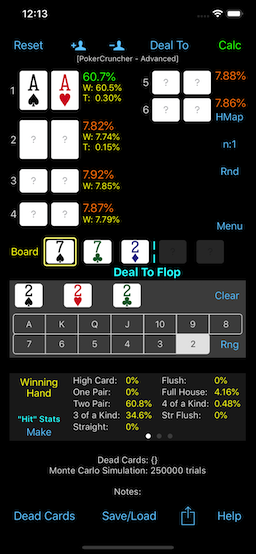
Here's how you would model this in PokerCruncher: Set the number of
players to 6. Give Player 1 (you) AA; leave the other 5 players' cards
blank (random). Enter 772 for the flop. Set
Deal-To
= Flop. Calculate, and see how often your aces are in the
lead. The below screenshot shows this example.
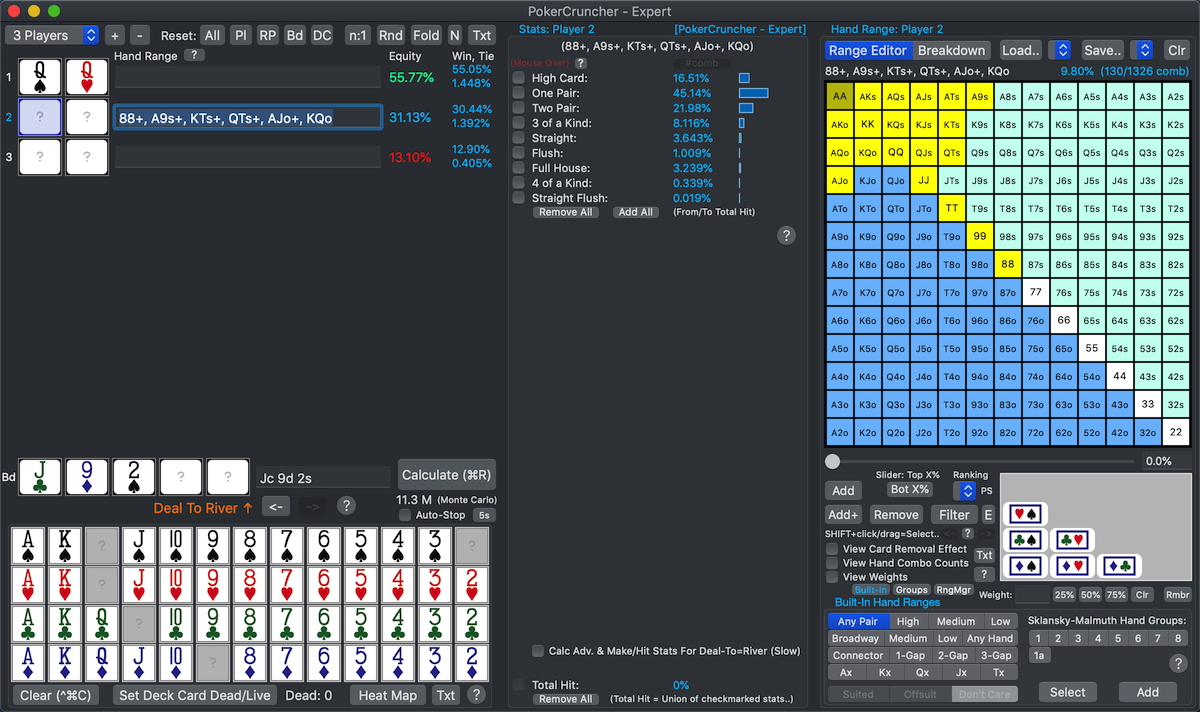
PokerCruncher's answer is you're in the lead on the flop with AA about
61% of the time. The other
39%
of the time, one of your 5 opponents has flopped trips or a full house
or quads (this is assuming
random
cards for your 5 opponents; if you want to be more accurate
you can put your opponents on
hand
ranges). Is this answer of
39%
higher or lower than you expected? If you nailed this question you
have our congratulations! Actually it's probably not as hard as we
made it out to be, maybe just counter-intuitive at first.
This example shows how PokerCruncher's powerful and general features
complement each other to enable you to answer just about any
odds/equity question.
--------------------------------------------------------------------------------
Example: Challenge: How Often Is AA In The Lead On The Flop
Against 5 Random Opponents, When The Flop Is Paired?:
Limitless Variety Of Interesting And Challenging Odds/Equity
Questions
These examples just scratch the surface of what you can do with
PokerCruncher. The powerful and general simulation and modeling
features complement each other well and enable you to answer a
limitless variety of interesting and challenging odds/equity
questions. The variety of scenarios and questions is limited only by
your skill and experience and creativity. As you become more
experienced and improve you'll find that you'll set up more
interesting or complex scenarios to investigate new aspects of the
game, or maybe even simpler and subtler but still important scenarios.
All of this powerful calculation and analysis is running locally on
your device/machine (
internet
connection not needed) so you can think and study poker
anywhere, any time.
Additional, Expert-Level Features (Mac-Expert
Version) (New!)
|
Back
To Top |
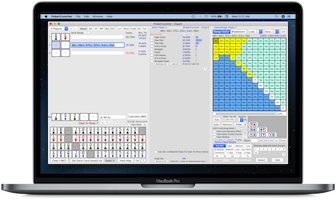
The
Mac-Expert
version of PokerCruncher has the following
additional,
expert-level features:
Hand Ranges Features: (Mac-Expert
Version)
Stats Features: (Mac-Expert
Version)
General Features: (Mac-Expert
Version)
|
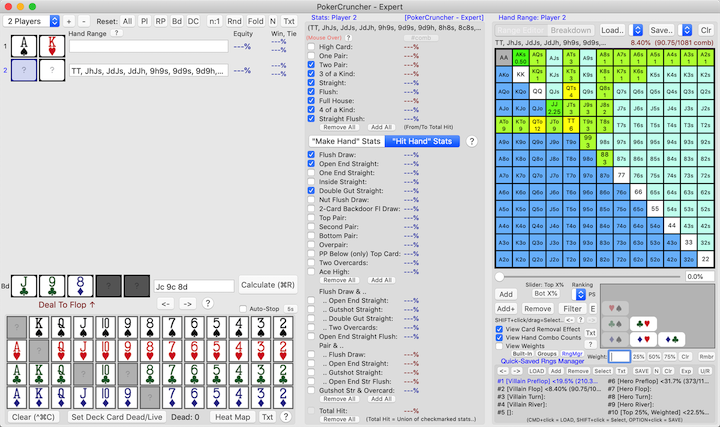
 |
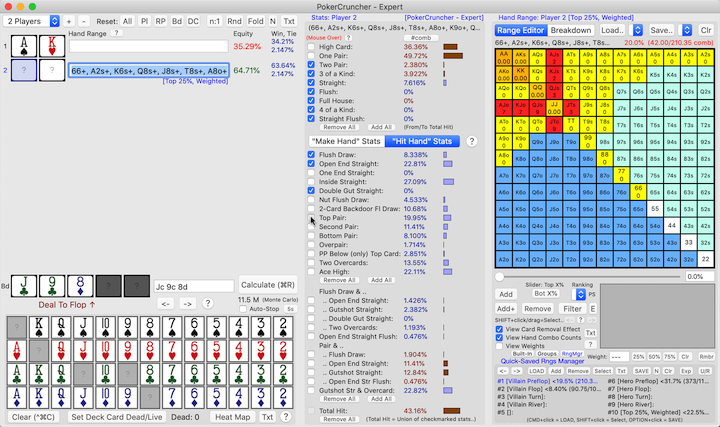
========== Hand Ranges Features (Mac-Expert
Version) ==========
Range Equity Distribution Graphs (Mac-Expert
Version)
|
Back
To Top |
A
range equity distribution graph
is a good way to see a range's
equity
breakdown across all of its hand combos. The
shape
of this graph can tell you a lot about the range's equity breakdown.
The
Range Equity Heat
Map feature discussed earlier is another good (but slightly
different) way to see this breakdown.
Distribution
graphs and
heat maps
each have their unique strengths and complement each other well, as
we'll discuss later in this section.
In a range equity distribution graph, the
X-axis
shows the range's
hand combos,
sorted from highest Equity
(at the left) to lowest Equity (at the right). The
Y-axis
shows each hand combo's
Equity.
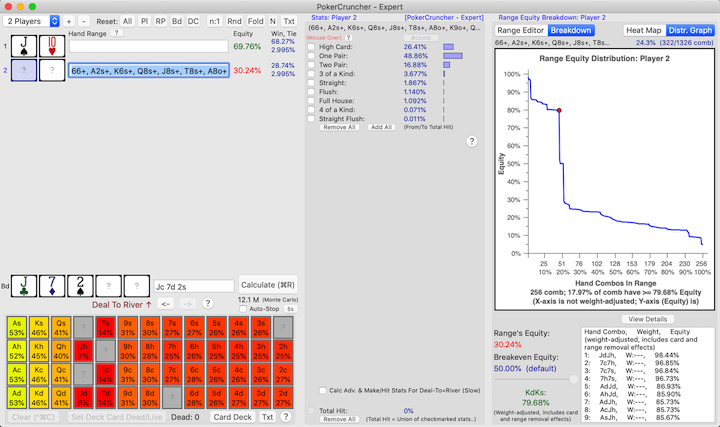
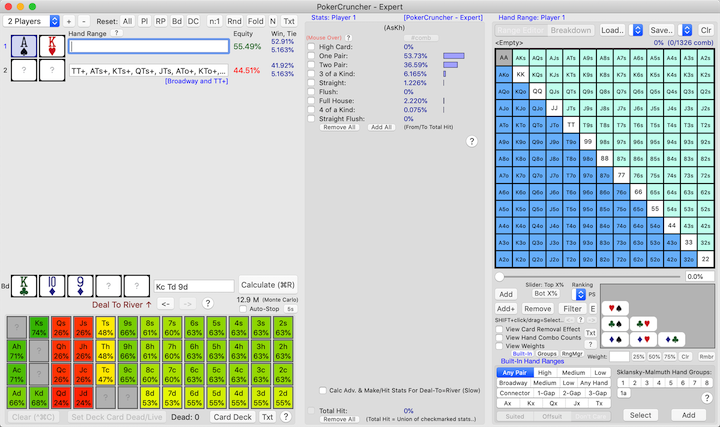
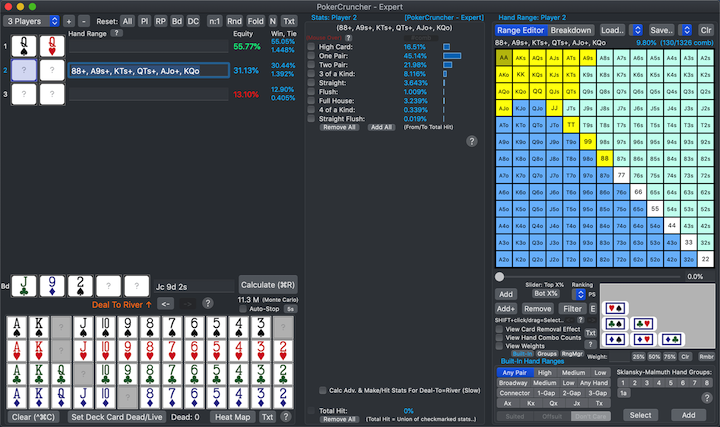
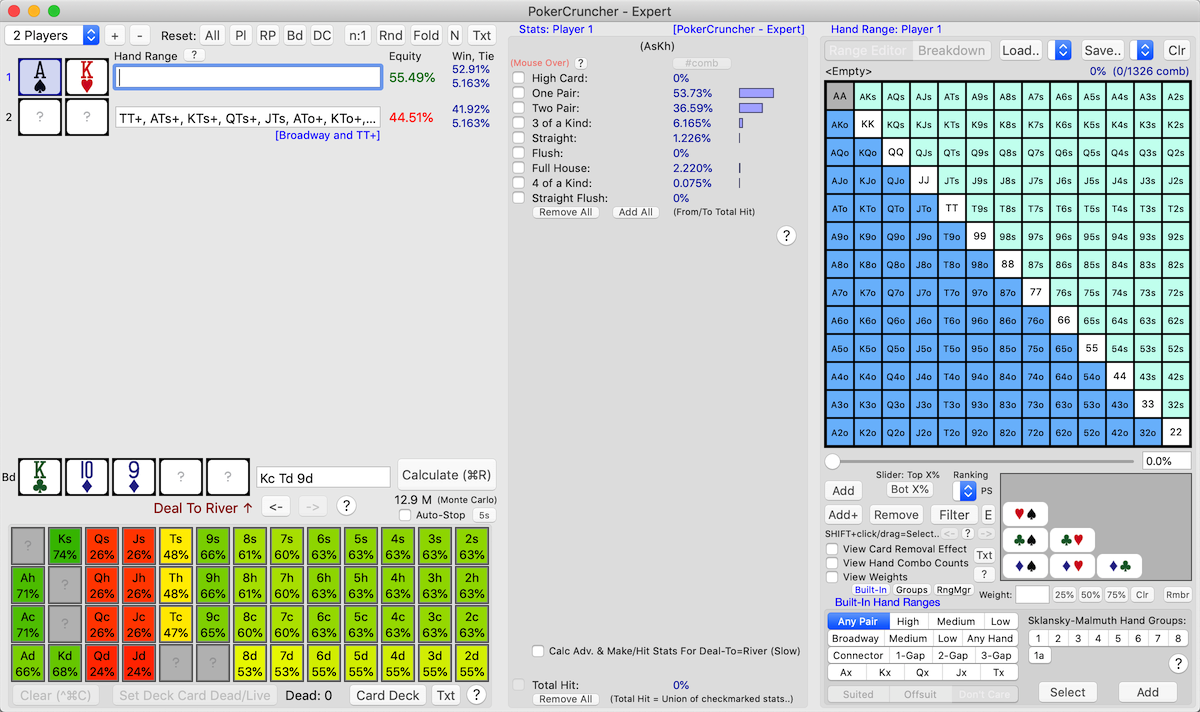
Real-Life Hand Situation: You Flop TopPair With JTo On A Dry Flop,
Villain Has Top25%OfHands:
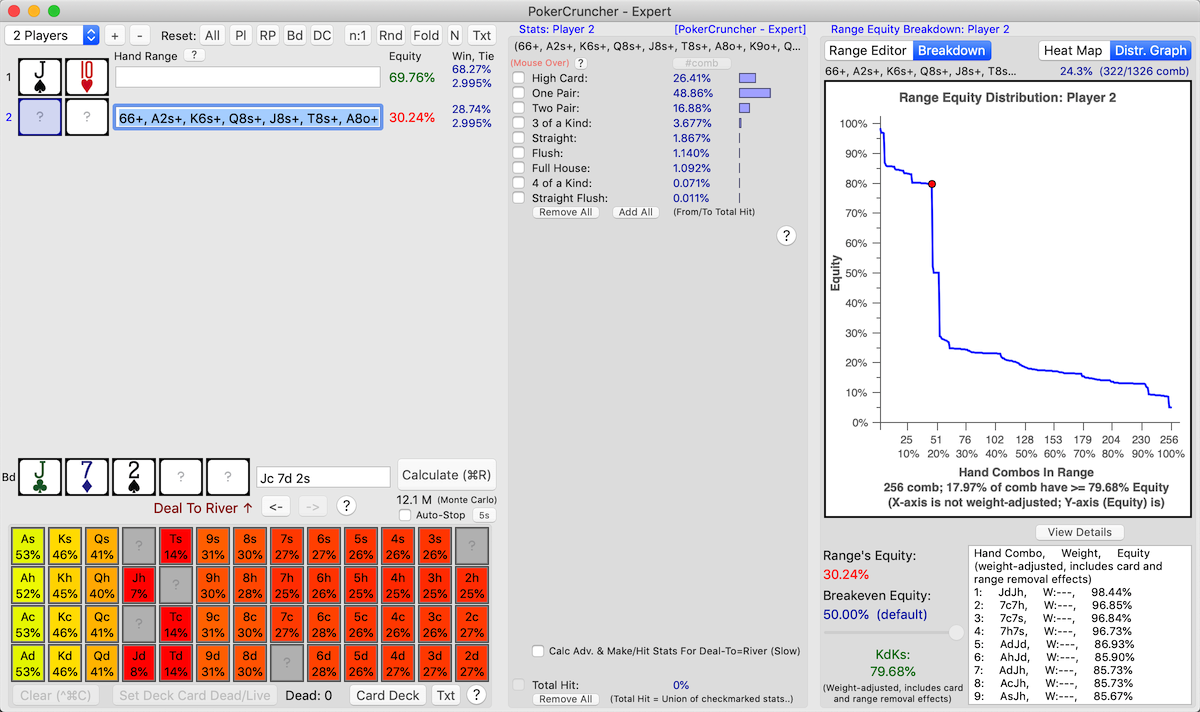
This example is shown in the below screenshot. You (with
JTo)
have flopped
TopPair on a dry
flop against a Villain with range
Top25%OfHands.
We see that Villain has only
30%
Equity on the flop. To understand this
30%
Equity number better, we see the range's
equity
distribution graph and notice that most (about
80%)
of the range's hand combos have low (
<
30%) Equity, but the bulk of the range's remaining hand
combos (a little less than
20%)
have very high Equity (
> 80%).
This indicates a
polarized range,
i.e. either Villain is well ahead in this situation or is well behind;
there are very few hand combos in his range that have breakeven (50%)
Equity.
--------------------------------------------------------------------------------
Example: Range Equity Distribution Graph: Villain Has A Polarized
Range:
Screenshot:
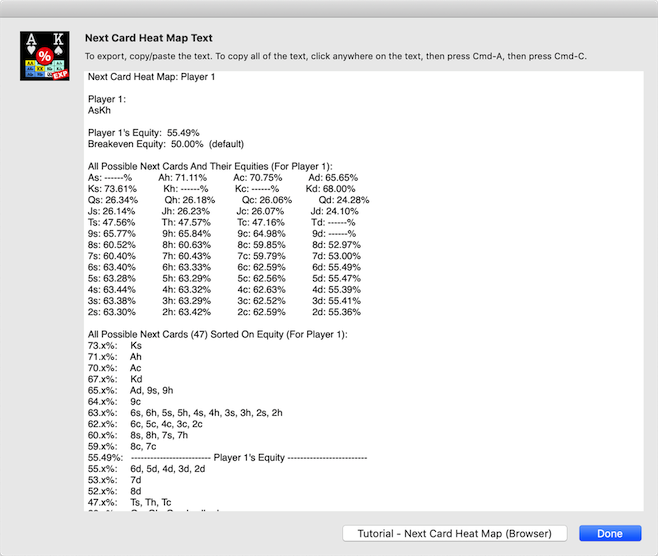
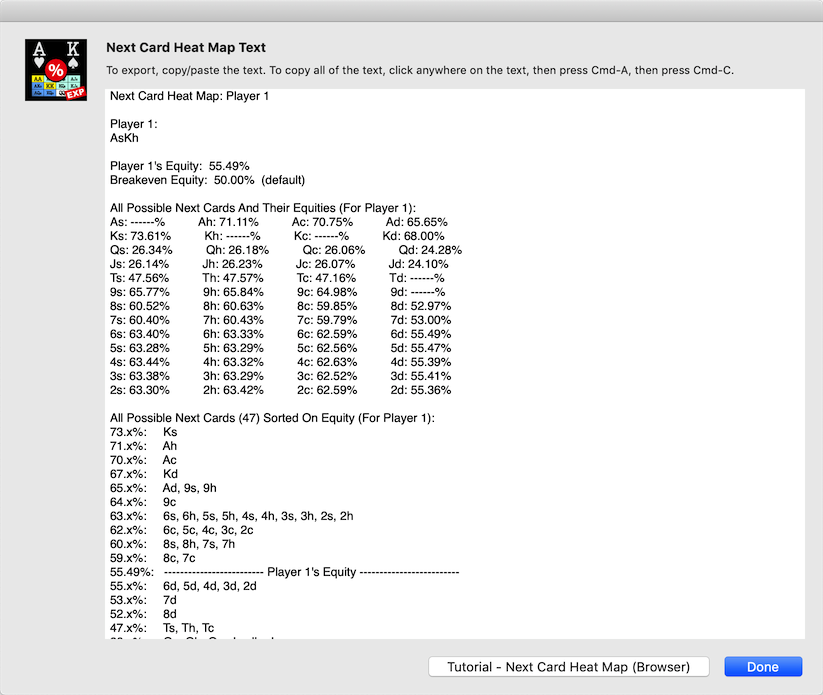
Note: Villain's
Next Card Heat Map is
also shown.
Polarized And Non-Polarized Ranges
In the above example, even though Villain is behind overall in this
scenario with only 30% Equity, he has a good number of hand combos (a
little less than 20%) that
have you
beat soundly. And he has a large number of hand combos (about
80%) that
you beat soundly.
This means he has a
polarized range.
This is a very different 30% Equity situation than one where most of
Villain's range's hand combos have around 30% Equity, with very few
hand combos that have significantly higher or significantly lower
Equity (i.e., a
non-polarized range).
You can tell if a range is polarized or non-polarized by looking at
the
shape of the distribution
graph.
A
polarized range looks
something like:
----------
|
|
|
----------
(Most of the hand combos are at the top or bottom of the graph, with
very few hand combos in the middle of the graph around the Breakeven
Equity level.)
A
non-polarized range looks
something like:
-
--
--------------
--
-
(Most of the hand combos are in the middle of the graph around the
Breakeven Equity level, with very few hand combos at the top or bottom
of the graph.)
A
polarized range is best
suited for either value betting or bluffing. A
non-polarized
range is best suited for bluff catching (i.e., check/call).
This kind of further digging down into a range's
equity
breakdown can help you understand the situation much better
than knowing just the range's overall Equity number.
Additional Features Of Distribution Graphs
PokerCruncher-Expert-Mac's
range
equity distribution graphs have some additional features:
- Click on a point on the
graph (on a point that corresponds to a hand combo) to see that
particular hand combo's details.
- “View Details” button
shows all hand combos' Equities, in sorted order. This is a
different ViewDetails text than for heat maps.
- Your selection/preference for
viewing Heat Map or Distribution Graph is saved in the
app's state.
Determining/Filtering The Top X %ile Of Hands Of A Range
The
“View Details” button mentioned in the preceding section lets us determine/filter the
top X %ile of hands of a range. The ViewDetails text lists all hand combos of the range in sorted order on Equity. So for example if we want the top 10 %ile of hands of the range, if the range has say 130 hand combos, we would look at 130 * 10% = hand combo #13 in the ViewDetails text and note its Equity, say it's 58%. Then we
filter the range on 58% Equity (using the
SHIFT+<E> button), and save the resulting subrange if desired. To make our life easier we can copy/paste the ViewDetails text outside the program somewhere first so we can look at it standalone. We can then repeat this process for more X %ile chunks of the range that we want.
Distribution Graphs And Heat Maps
Let's compare
distribution graphs
and
heat maps.
PokerCruncher-Expert-Mac has both of these features, and each feature
has its unique strengths.
Heat maps show
hands e.g. AA,
JTs, etc. clearly using
cells
and
colors so you can easily
see which hands (cells) have high equity, low equity, and breakeven
equity. Distribution graphs don't show individual hand names (you'll
have to click the
"View Details"
button for that).
However, distribution graphs show
hand
combo counts and weighting better than heat maps. In a
distribution graph each hand combo is given an equal amount of space
on the X-axis so each hand combo is treated equally. However in a heat
map, you have to keep in mind yourself that a pair cell has 6 hand
combos, a suited cell has 4 hand combos, and an offsuit cell has 12
hand combos. Distribution graphs also show the
shape
of the equity distribution better than the colors of a heat map.
But distribution graphs and heat maps have the same purpose, to show a
range's
equity breakdown, and
have some similarities. For example, both can quickly indicate if the
range is
polarized or
non-polarized.
We saw above how the
shape of
a distribution graph indicates this. A heat map indicates this using
color;
a polarized range has mostly
green-ish
or
red-ish cells, with very
few
yellow-ish (breakeven
equity) cells. A non-polarized range would appear as mostly
yellow-ish
cells in the heat map.
If an app has both distribution graphs and heat maps like
PokerCruncher-Expert-Mac, that's the best of both worlds and you get a
clear and full picture of a range's equity breakdown.
Additional Hand Ranking Systems For Top X% Of Hands
Slider/TextField (Mac-Expert
Version)
|
Back
To Top |
The
“Ranking” popup selector
under the
top x% of hands slider
lets you choose from
8 useful hand
ranking systems:
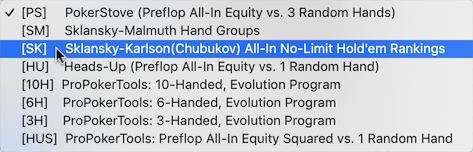
- PokerStove (preflop
all-in equity vs. 3 random hands)
- This hand ranking system balances the value of high
cards with the value of drawing
cards.
- Sklansky-Malmuth Hand Groups
- This hand ranking system, created by David
Sklansky and Mason
Malmuth, ranks playable starting hands at a full table.
- Sklansky-Karlson(Chubukov)
All-In No-Limit Hold'em Rankings
- This hand ranking system is based on a heads-up
preflop push/call/fold decision model.
- Heads-Up (preflop all-in
equity vs. 1 random hand)
- ProPokerTools: 10-handed,
evolution program
- This hand ranking system "evolves"
its final hand ranking slowly over time, over each iteration the
program runs. A given hand isn't pitted simply against random
hands, but against a progressively-refined set of "good"
hands that the program computes and improves on on each
iteration.
- ProPokerTools: 6-handed,
evolution program
- ProPokerTools: 3-handed,
evolution program
- ProPokerTools: pre-flop
all-in equity squared vs.
1 random hand
- The key word in this hand ranking system is "squared".
Because a hand's equity (on each possible board, against the 1
random hand) is squared, drawing
hands like JTs (which can make the nuts or nearly the
nuts, i.e. 100% equity or nearly 100% equity) go
up in value compared to non-drawing hands (like A8o)
that make the nuts or nearly the nuts way less often.
Non-drawing hands make mostly medium-strength hands, which have
equity in the neighborhood of 50% on the vast majority of
possible boards. Squaring these medium-strength equities isn't
nearly as much of a benefit as squaring 100% or nearly 100%
equities, so drawing hands go up in value in this hand ranking
system.
PokerStove's hand ranking
system is the default (preflop all-in equity vs. 3 random hands).
These hand ranking systems are used by the
top
x% of hands slider/text-field, and also when you enter a
range
%age in a
player's hand
range text field in
the main view (left hand side of the app's window).
These
8 established and well-known
hand ranking systems each have their own
strengths
and
weaknesses, and are best
suited for different types of games (e.g.,
cash
games vs.
tournaments,
no-limit vs.
limit,
heads-up vs.
short-handed
vs.
full table).
We (
PokerCruncher, LLC) didn't
invent these hand ranking systems; explaining and discussing all of
them fully here is out of the scope of this Tutorial; we couldn't
easily do the topic justice. For further info. we suggest you
google
search these hand ranking systems. And of course you can try
out these different hand ranking systems in this app on some example
ranges like Top5% or Top20% or Top50% and see what their differences
are.
%age Weights In Hand Ranges (Mac-Expert
Version)
|
Back
To Top |
%age weights are a more
granular, more
general,
and more
convenient weighting
mechanism than
hand
combo weights (Hand Combos view). The
"Weight"
text field lets you assign an
integer
%age weight to the selected added cell(s),
[1%
.. 99%]. For an added cell, a blank/cleared weight means no
weight i.e. the default weight 100%. "---" means multiple cells
selected and no change to their weights yet (you can multi-assign a
weight).
In the
Hand Combos
(Weights) In Hand Ranges section above, we used
hand
combo weights (Hand Combos view) to lower the weight of two
cells (AKo and AKs) to 50%. In this section in
Example
1, we'll do the same using
%age
weights. And in
Example 2,
we'll do a hand range weighting that we can't do with hand combo
weights (Hand Combos view). These examples show how %age weights are
more
general than hand combo weights (Hand Combos view).
--------------------------------------------------------------------------------
Example 1: %age Weights (50%) For AKo And AKs
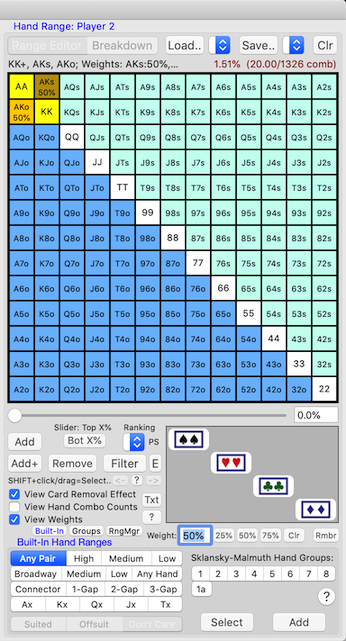
We put opponent on hand range {KK+, AKs, AKo}. We want to lower AKo's
and AKs's weight to 50%. Here's how we can do this using
%age
weights:
- Player 2 (opponent): Enter hand
range {KK+, AKs, AKo}.
- SHIFT+click the AKo
grid cell to select it.
- In the "Weight" text field,
enter "50" (without the quotes), <Return>. Or use the "50%"
button.
- SHIFT+click the AKs
grid cell to select it.
- In the "Weight" text field,
enter "50" (without the quotes), <Return>. Or use the "50%"
button.
In addition, we'll turn ON the
"View
Weights" checkbox setting; this shows weights in the range
grid.
The below screenshots show the resulting weighted hand range.
1st screenshot: AKo
cell is selected
2nd screenshot: AKs
cell is selected
More Granular, More General, And More Convenient
- A %age weight can have any integer
value from 1% to 99%,
which is more granular
than hand combo weights (Hand Combos view) where we remove
<x> hand combos out of a cell's 4 or 6 or 12 hand combos.
- Note that for both the AKo and AKs cells, all of the cells' hand
combos are enabled (12
and 4 hand combos, respectively). This means that all of these
hand combos are live and
assign-able in the hand range. If we use hand combo
weights (Hand Combos view) to do the weighting, we have to
manually/artificially remove some of the hand combos, and these
removed hand combos aren't live and assign-able in the hand range
(which could make a difference if specific-suit flush draws are
involved in the scenario, so we have to be careful). This makes
%age weights more general
than hand combo weights (Hand Combos view). Of course, sometimes
we do want to restrict the hand range to specific suits, and in
these cases it's appropriate and necessary to remove specific hand
combos.
Assigning %age Weights
- %age weights can only be assigned to cells that have been added
to the hand range.
- The “Weight" text field
lets you assign an integer %age
weight to the selected added cell(s), [1%
.. 99%].
- For an added cell, a blank/cleared
weight means no weight i.e. the default weight 100%.
- You can use the "25%",
"50%", "75%"
buttons to assign weights
(OPTION+click on these buttons sets custom
values for these buttons).
- You can multi-assign
weights (when you have multiple added cells selected).
- When in Groups Editor:
- In a group, you can
give an added cell a different
(lower) weight than the weight the cell has in the
current hand range. Of course, the cell's weight across all of
the groups must not sum to
more than the cell's weight in the current hand range.
- FN+<Enter
Weight In Weight Text Field> treats the entered
weight as %age of this
cell's weight in the current range, not as an absolute
value. Similarly for FN+<25%>,
FN+<50%>, FN+<75%>.
Fast-Assigning %age Weights
- The "Rmbr" button
remembers the current weight; OPTION+click/drag on an added
cell(s) assigns the remembered weight to the added cell(s).
Viewing %age Weights
- In the range grid, weighted cells are colored on a yellow
-> orange color gradient (fully added cells) or light-green
-> green color gradient (partially-added cells).
- The “View Weights” checkbox
setting shows weights in the range grid.
PokerCruncher Hand Range Text Syntax For %age Weights
%age Weights Across The App
- Range %age's and hand combo counts in the Range Editor, Heat
Map, and Distribution Graph views are weight-adjusted.
- Of course, %age weights are handled in save/load,
quick-save/quick-load, export/import,
and in the app's state,
for both hand ranges and
scenarios.
- The Range Editor view's “?”
(Help) button/screen has a section on %age weights.
- The players' hand range text fields' “?”
(Help) button/screen (near the top of the main view (left
hand side of the app's window)) has a section on PokerCruncher
hand range text syntax for weights, and other
programs' hand range text syntaxes for weights.
- Other Help screens have also been updated for %age weights e.g.
the Keyboard Shortcuts Help
screen.
--------------------------------------------------------------------------------
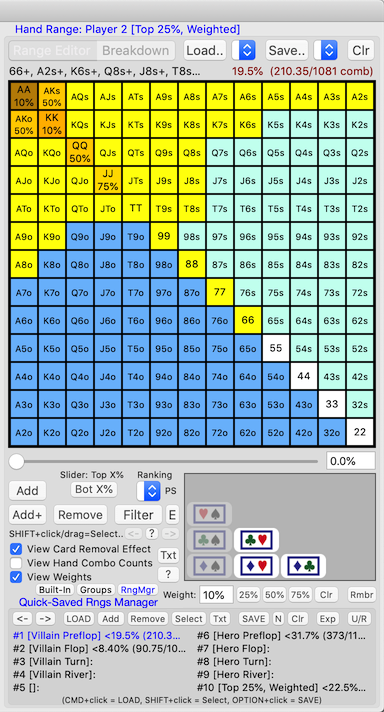
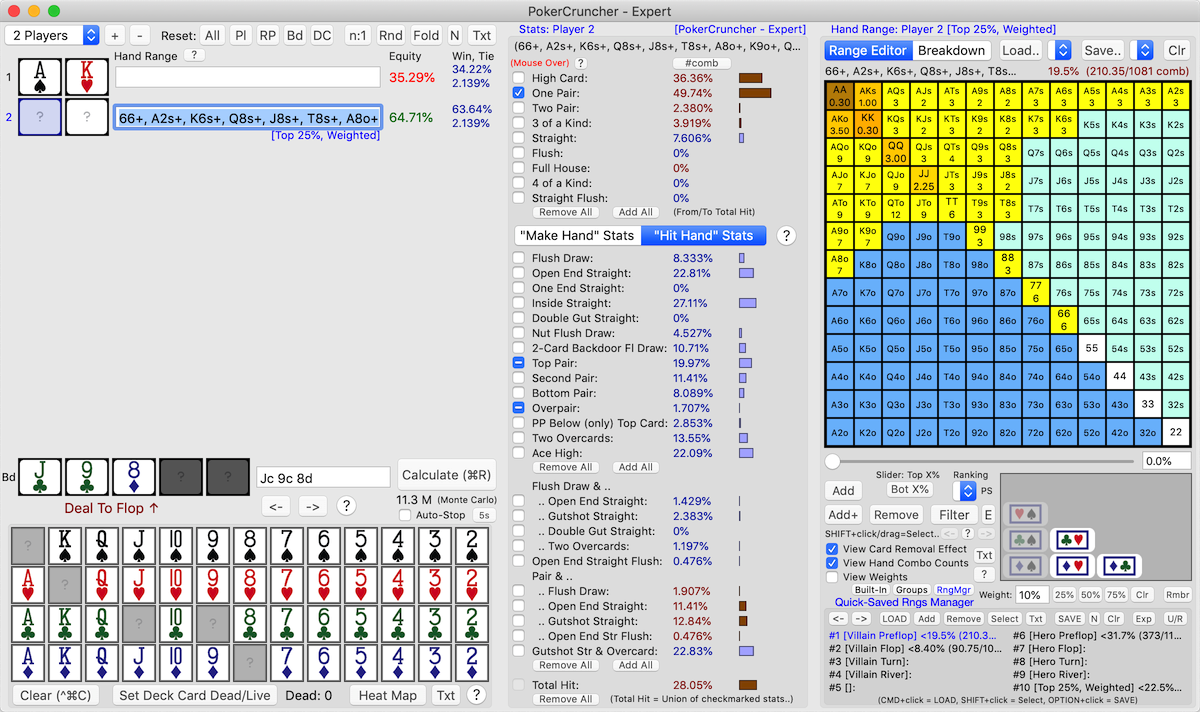
Example 2: Top 25% Of Hands, With The Super-Strong Hands Weighted
Down
Screenshot: AA
cell is selected,
"View
Weights" checkbox setting is ON
A
real-life hand situation
for the weighted hand range in
Example
2 is: opponent raises pre-flop (we'll ignore position and
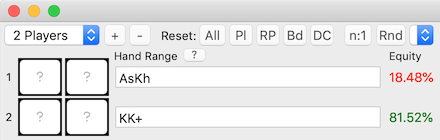
other factors here for simplicity), you 3-bet with AsKh, opponent just
calls your 3-bet.
Opponent raised pre-flop so we put him on a strong range of hands e.g.
Top 25%. But opponent just
called your 3-bet (he didn't 4-bet), so he probably doesn't have a
super-strong hand, so we weight down the super-strong hands of his
range. Note that we assign a very low weight of
10%
to the two strongest hands of his range,
AA
and
KK, because he most
probably would have 4-bet with these hands. We assign higher weights
to AKo, AKs, QQ, and JJ, in this order.
View Hand Combo Counts In Hand Range Grid
(Mac-Expert
Version)
|
Back
To Top |
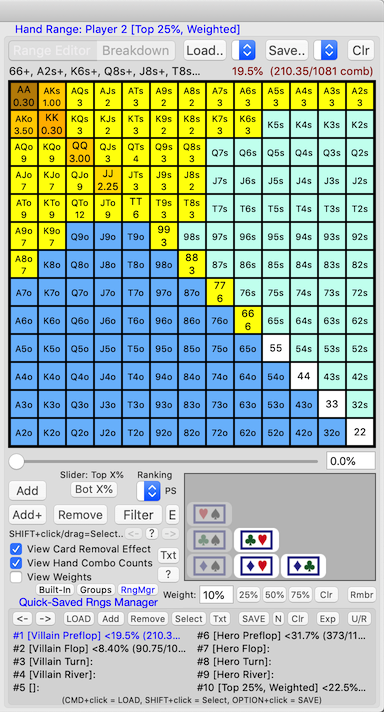
If you turn ON the
“View Hand Combo
Counts” checkbox setting in the Range Editor view, each grid
cell in the range grid shows its
hand
combo count (
weight-adjusted).
View Card Removal Effect
Also note the related
checkbox
setting “View Card Removal Effect”. If you turn this setting
ON,
card removal effect is
shown in the
range %age (top
right), in the
range grid cells'
hand combo counts, and in the
Hand
Combos view. Note
that this setting shows
card removal
effect, but not
range
removal effect. So, if you want to assign a specific hand to
a player, assign the player
2
specific cards from the
card
deck; don't assign the player a (1-combo)
hand
range. This way, the player's hand will be in the scope of
the "View Card Removal Effect" setting. Also note that calculation
results take
both card and range
removal effects into account i.e.
all
removal effects (calculation results must take all removal
effects into account in order to be correct).
The below screenshot shows this feature using the
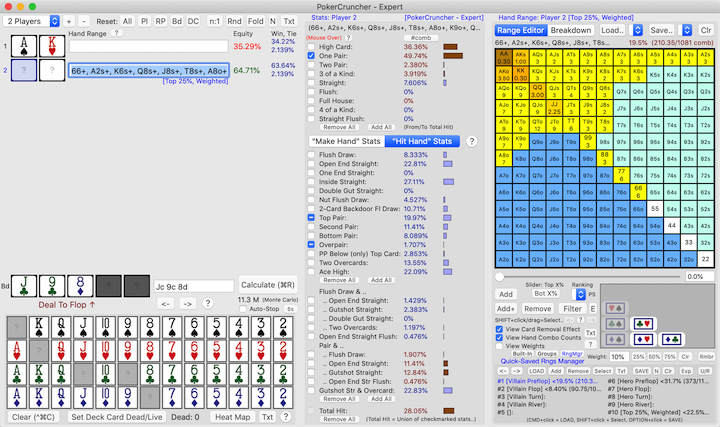
Mouse
Over A Range's Stats When Doing Flop/Turn/River Texture Analysis
section's example scenario. In the below example both
“View
Hand Combo Counts” and
“View
Card Removal Effect” are turned ON.
--------------------------------------------------------------------------------
Example: View Hand Combo Counts In Hand Range Grid (And Also View
Card Removal Effect):
Screenshot: AA
cell is selected
Filter Hand Range (On Flop/Turn/River) (Mac-Expert
Version)
|
Back
To Top |
This operation (
"Filter" button)
applies (is available) when
specific
flop / flop+turn / flop+turn+river cards have been assigned,
and when
Deal-To = Flop/Turn/River.
This feature lets you
filter (narrow
down) a hand range based on hand types (stats) that you
select (turn
ON /
"-")
in the Stats view using the stats' checkbox buttons.
SHIFT+<Filter> =
negative-filter
hand range, i.e. remove the selected hand types (stats) from
the hand range.
Also, the
"Filter" button
provides a way to
minimize/clean-up
a hand range's hand combos:
CTRL+<Filter> =
filter
hand range on all assign-able hand combos (if "View Card Removal
Effect" setting is ON), i.e. remove all un-assign-able hand
combos from the hand range to
minimize/clean-up
the hand range's hand combos.
**Note**: You need to be doing
flop/turn/river texture analysis
for a hand range for the Filter Hand Range operation to be enabled
(Deal-To = Flop/Turn/River, with a specific flop / flop+turn /
flop+turn+river). For example, if you have assigned 3 board cards (the
flop), and have set Deal-To =
River (or
Turn),
then this operation will
not
be enabled. You need to set Deal-To =
Flop
here for this operation to be enabled.
Uses
1)
Refine (Narrow Down) a Range
Street to Street: Start with a preflop range e.g. TopX%, then
deal
flop cards and set
Deal-To
= Flop and filter the range, then deal a
turn
card and set
Deal-To = Turn
and filter the range again (further), to repeatedly
refine
(
narrow down) the range as the
hand progresses
street to street.
Quick-save the original range
and each refinement/subrange at
each
street so you can go back and forth and compare (e.g. the
ranges' hand combo counts).
2)
Generate Subranges: Quick-save
the original range. In the Stats view, turn
ON
the checkmarks of the stats (hand types) that you want to include in
the first subrange (stats marked as
"-"
are then
deleted), then
filter
the original range to generate the first subrange, then
quick-save
the first subrange. Repeat to generate the other subranges.
3)
Build a Range: To build a
range from scratch based on hand types (stats), start with range
Top100%
(all hands), then do a
filter hand
range operation that keeps only the hand types (stats) you
want.
Steps
1)
Set up your scenario:
assign players' cards/ranges (where there's
at
least one hand range), assign
specific
flop / flop+turn / flop+turn+river cards, and set
Deal-To
= Flop/Turn/River.
2)
Calculate.
3)
Click/select the desired hand
range in the main view (left hand side of the app's window).
**Note**: A red "Mouse Over"
indicator label is shown/enabled at the top left of the Stats view.
This indicator label is a further indication that the filter hand
range operation applies (is available).
4) In the Stats view,
turn ON the
checkmarks of the stats (hand types) that you want to filter
the hand range on (stats marked as
"-"
are then
deleted).
5)
Click the "Filter" button.
You may want to
quick-save
the original range first, and then also the filtered range
(refinement/subrange).
When the
"Filter" button is
clicked, the hand range is
filtered
(narrowed down), keeping only the hands (hand combos) that
are in the hand types (stats) that you selected in the Stats view.
SHIFT+<Filter> =
negative-filter
hand range, i.e. remove the selected hand types (stats) from
the hand range.
Undo And Redo
1) To
undo a filter hand
range operation, click the
"<-"
button that's under the "Filter" button. To
redo
a filter hand range operation, click the
"->"
button.
**Note**:
This 1) method has only
1 level of
undo. The below 2) method gives multiple levels of undo.
2) You can also
quick-save
each variation of the hand range into the #1 .. #200 range slots so
you can go back to any previous point (using the quick-save pulldown
button at the top of the Range Editor view).
**Note**:
This 2) method gives
multiple levels
of undo.
3) You can also simply use
copy/paste
to save each hand range variation's text outside of this app e.g. in a
text editor.
--------------------------------------------------------------------------------
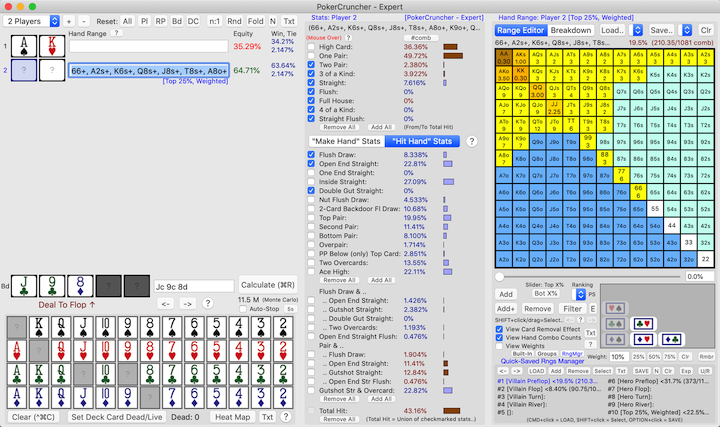
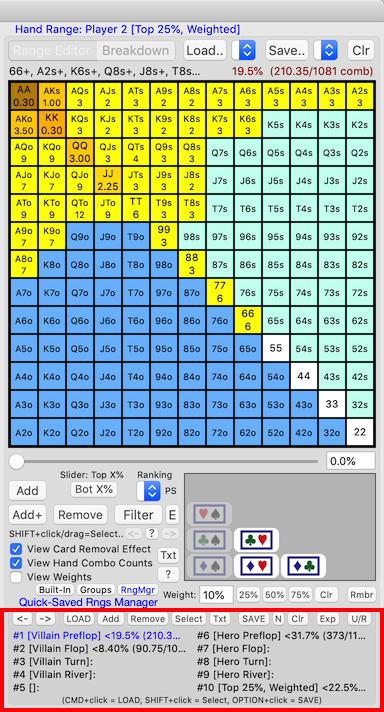
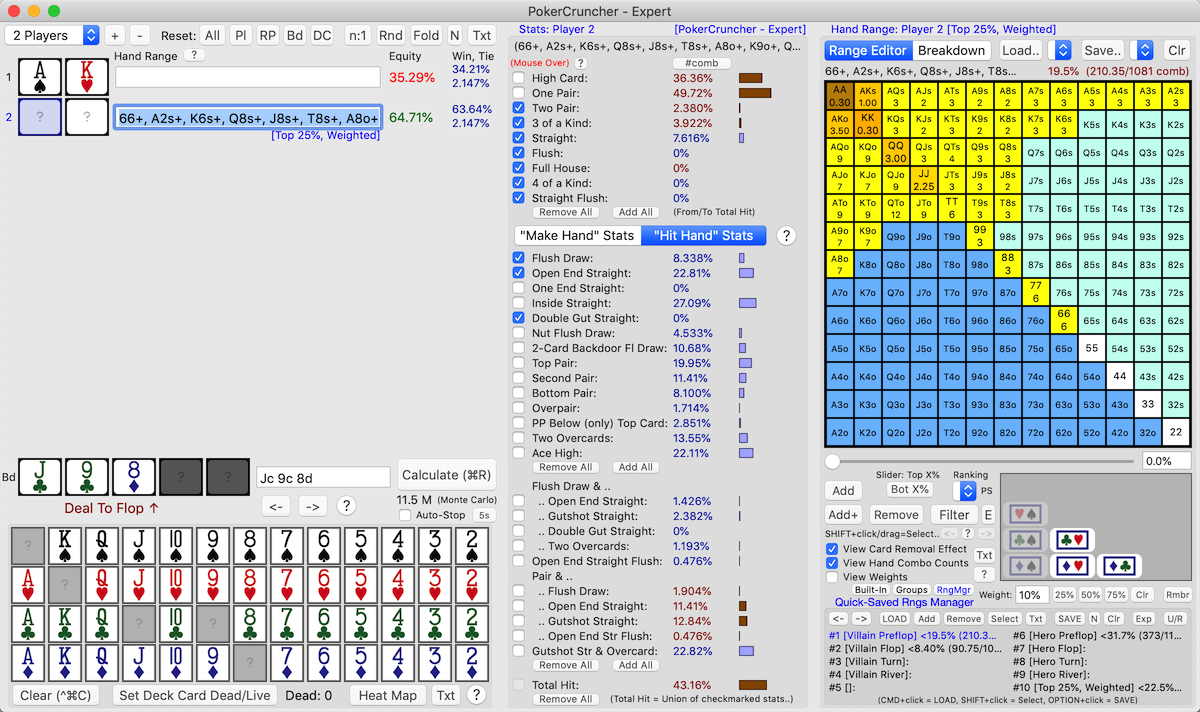
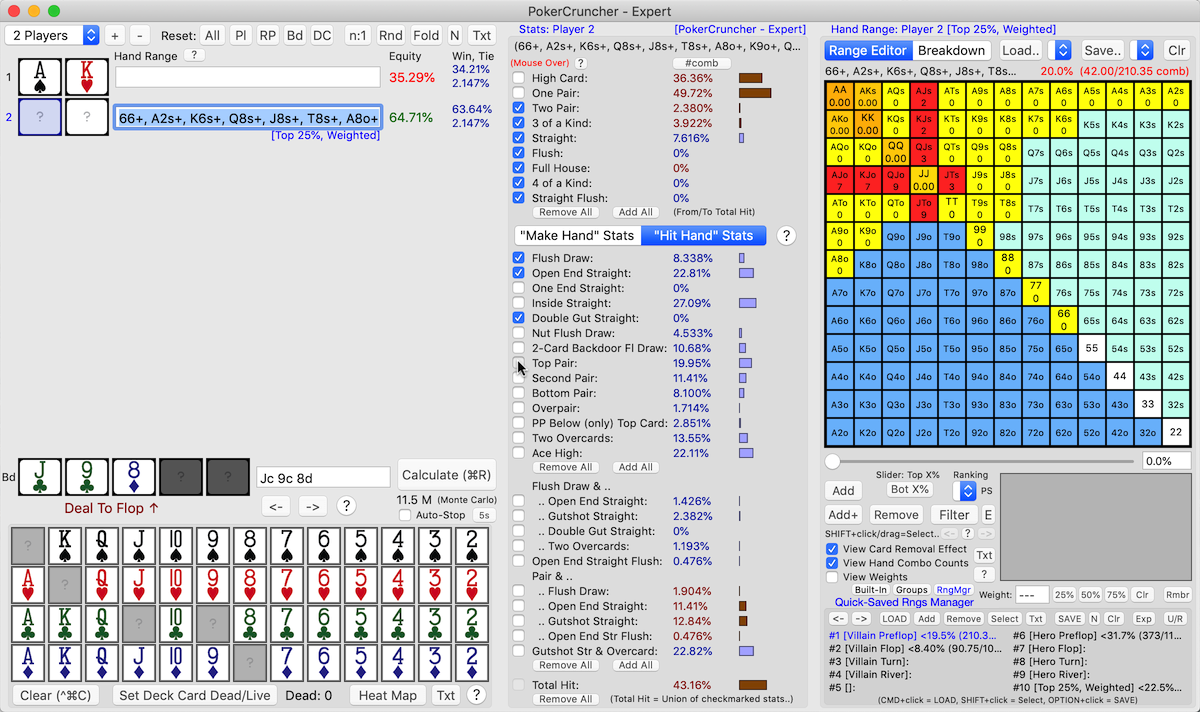
Example: **Before** Filter Hand Range:
Note that the original hand range
has 210.35 hand combos (is
fractional because some of the cells have weights).
Screenshot: AA
cell is selected
--------------------------------------------------------------------------------
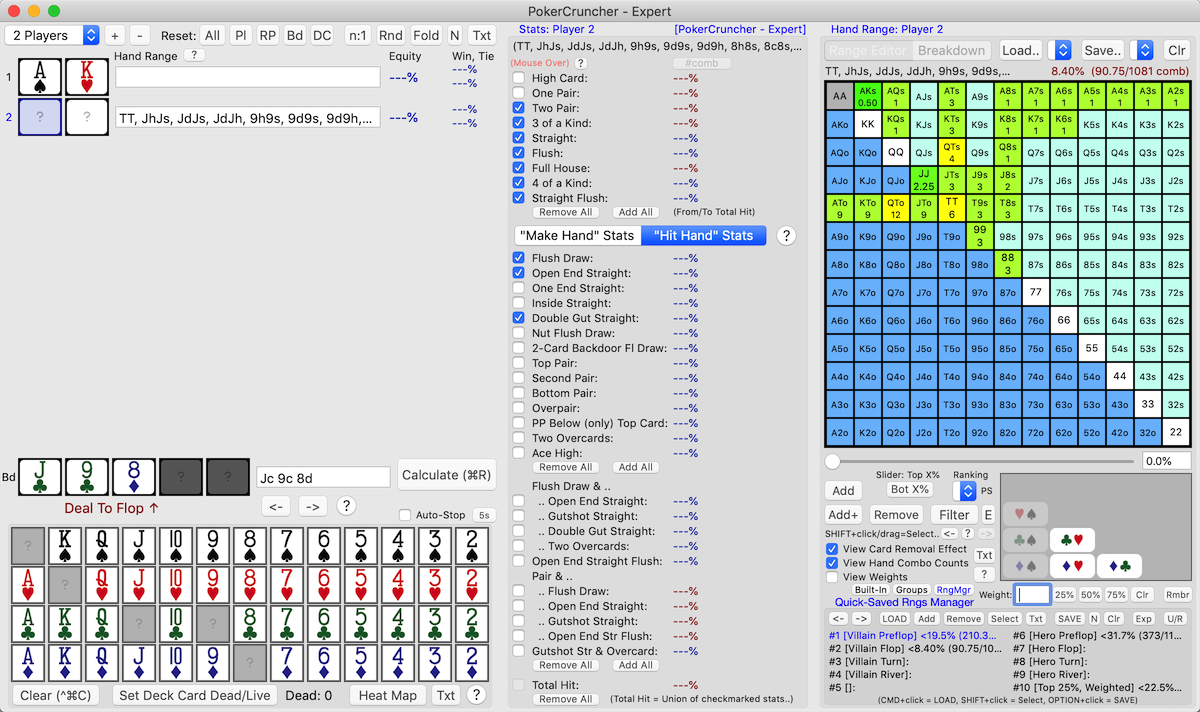
Example: **After** Filter Hand Range:
Note that the filtered hand range
has 90.75 hand combos (is
fractional because some of the cells have weights). These 90.75 hand
combos are the hand combos of the original range that are in the
stats (hand types) that we selected in the Stats view (using the
stats' checkbox buttons).
Also note that the "<-"
button that's under the "Filter" button is now enabled;
this button lets you undo
the filter hand range operation (1 level of undo).
You can also quick-save
each variation of the hand range into the #1 .. #200 range slots so
you can go back to any previous point (multiple levels of undo).
Screenshot: AA
cell is selected
Filter Hand Range On Equity (Mac-Expert
Version)
|
Back
To Top |
You can also
filter a hand range on
Equity, using the
“E”
button to the right of the “Filter” button in the Range
Editor view. You can do
*cell-level*
filtering (using the Range Equity Heat Map's calculation
results), or
*combo-level* filtering
(using the Range Equity Distribution Graph's calculation results):
<E> =
*cell-level* filtering
(using Range Equity Heat Map's calc. results)
SHIFT+<E> =
*combo-level*
filtering (using Range Equity Distribution Graph's calc.
results)
In the
"Filter Hand Range On Equity"
popup dialog:
1) The
"Filter" button
filters the hand range, keeping only the cells (or hand combos) that
have at least the specified Equity, using the Range Equity Heat Map's
(or Range Equity Distribution Graph's) calculation results.
2) The
"Negative-Filter" button
removes the cells (or hand combos) that have at least the specified
Equity from the hand range, using the Range Equity Heat Map's (or
Range Equity Distribution Graph's) calculation results.
**** Note ****
We feel that the
Filter Hand Range
On Equity operation (this section's feature) is
useful/applicable in some types of scenarios (like
range
vs. range) but not in some other types of scenarios (like
specific
hand vs. range). In scenarios of the latter type (
specific
hand vs. range), we feel that the
Filter
Hand Range On Hand Types (Stats) operation (
previous
section's feature) is more useful/applicable.
--------------------------------------------------------------------------------
Example: Calculate What Range Has 33% Equity Against Opponent's Range:
Steps:
1)
Click ResetAll button to
start clean.
2)
For Player1 (opponent),
enter his range.
3)
For Player2 (you), we'll
calculate what range has 33% equity against Player1's range. The
"E" button for
this is a filter operation, so we'll start with the
all-hands range (max range) and filter it down. So for Player2
enter the range Top100% of hands e.g.
by using the range slider. Or instead of 100% of hands you can
start with whatever applicable preflop range you desire.
4)
Calculate (click "Calculate" button).
5)
Click the "E" button and
follow the directions e.g.
enter the 33% equity value. Player2's range will then
be filtered down to the hands/cells that have >= 33% equity.
Color-Coded Groups In Hand Ranges (Groups Editor)
(Mac-Expert
Version) (New!)
|
Back
To Top |
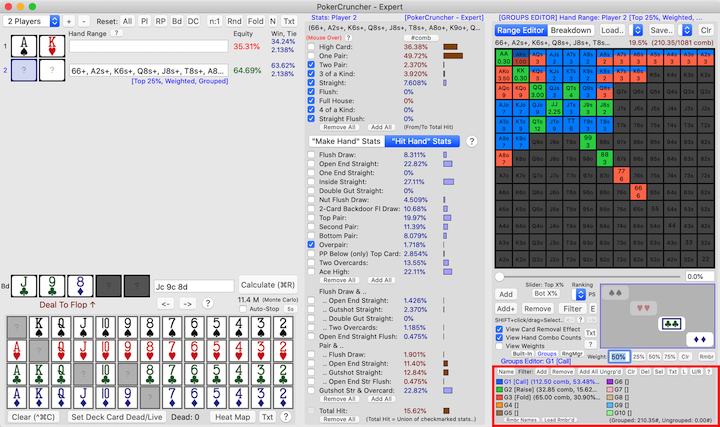
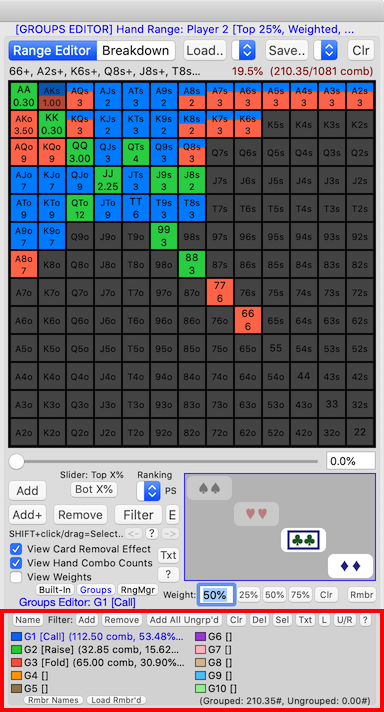
Click the
"Groups"
button in the Range Editor view to show the
Groups
Editor. This view lets you break up the current hand range
into
color-coded groups (up
to
10 groups in a hand
range), and see useful info. about the groups (e.g.,
number
of hand combos in each group).
**Note**: When you're in this
view (
Groups Editor), you can
only
edit groups; you can't
edit the
current hand range
itself (to do that, switch out of the Groups Editor).
Select a group
1)
Click/select a group to
edit.
**Note**: The
Hand
Combos view and
Weight text
field show the
selected
group's hand combos and weights. The
hand
range grid shows
all
groups' colors; ungrouped cells are colored
white,
and cells that aren't in the current hand range are colored
dark-gray
and are
uneditable. Also, the
hand range grid shows the
current
hand range's hand combo counts and weights if these settings
are ON,
not the
selected
group's hand combo counts and weights, to let you see the
(entire)
current hand range while you're editing groups.
"Name" button
2) Click the
"Name" button to
give the selected group a custom name, if desired.
Add/remove cells and individual hand combos to/from the selected
group
3) In the hand range grid,
click on
cells to
add/remove the
cells to/from the selected group. You can also use the "Add",
"Remove", etc. buttons in the Range Editor view.
4) You can also
click on individual
hand combos in the Hand Combos view to
add/remove
individual hand combos to/from the selected group.
(
Note: Partial/multiple
colors/groups on a cell
are
supported.)
**Note**: In 3) and 4), of
course, you can only add/remove cells and individual hand combos
that
are in the current hand range; all other cells and hand
combos are
uneditable.
Select cells, multi-select/unselect cells, etc.
5) In the hand range grid, in addition to clicking on cells to
add/remove the cells i.e. 3) above, you can also
SHIFT+click/drag,
SHIFT+CMD+click/drag,
CTRL+click/drag,
and
CMD+click on cells, as in
the Range Editor view. These actions have the same meaning as in the
Range Editor view (e.g.
SHIFT+click/drag
= Select cell(s)), except the last two remove/add actions
operate on the
selected group
of course, not on the current hand range.
Weights in groups
6) In a
group, you can give
an added cell a
different (lower)
weight than the weight the cell has in the current hand
range. Of course, the cell's weight across all of the groups
must
not sum to more than the cell's weight in the current hand
range.
FN+<Enter
Weight In Weight Text Field> treats the entered weight as
%age of this cell's weight in
the current range, not as an
absolute
value. Similarly for
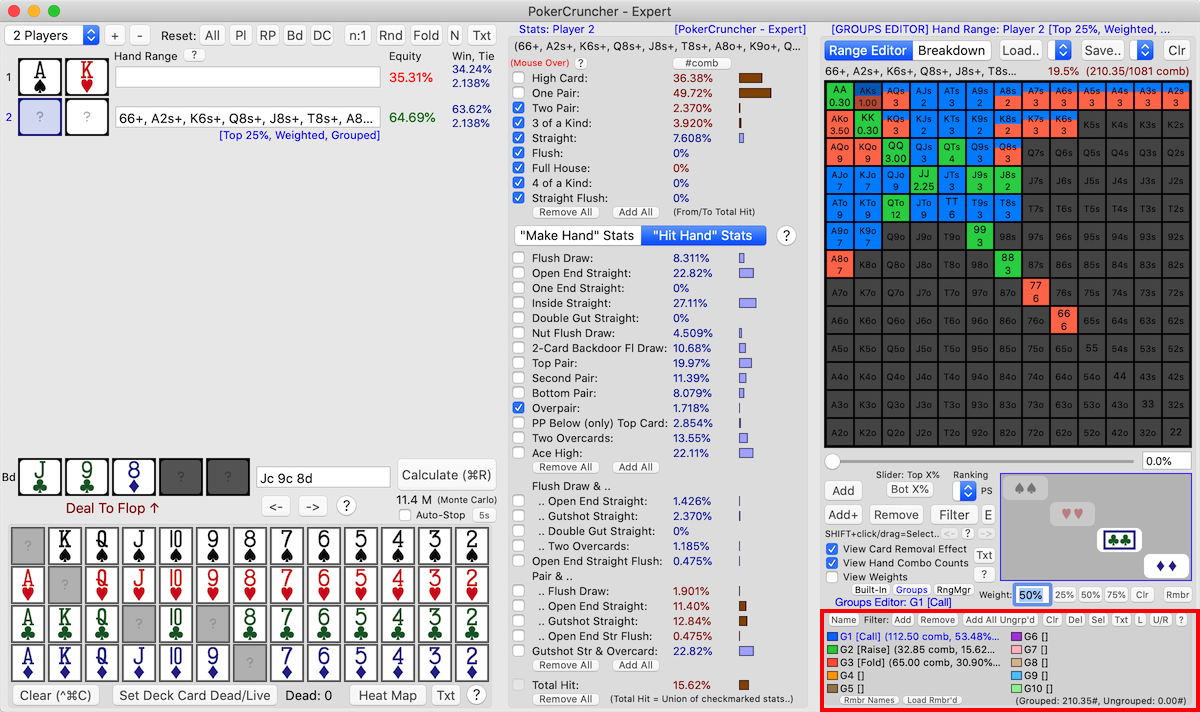
FN+<25%>,
FN+<50%>,
FN+<75%>.
(
Note: Partial/multiple
colors/groups on a cell
are
supported.)
Filter "Add" and "Remove" buttons
7) You can also use the
Filter
"Add" and
"Remove"
buttons to
add/remove
desired cells and hand combos to/from the selected group,
based on hand types (stats) that you select (turn ON / "-") in the
Stats view using the stats' checkbox buttons. These operations apply
(are available) when specific flop / flop+turn / flop+turn+river cards
have been assigned, and when Deal-To = Flop/Turn/River.
**Note**: You need to be doing
flop/turn/river texture analysis
for a hand range for the Filter "Add" and "Remove" buttons to be
enabled (Deal-To = Flop/Turn/River, with a specific flop / flop+turn /
flop+turn+river). For example, if you have assigned 3 board cards (the
flop), and have set Deal-To =
River (or
Turn),
then these operations will
not
be enabled. You need to set Deal-To =
Flop
here for these operations to be enabled.
"Add All Ungrouped" button
8) You can use the
"Add All
Ungrouped" button to
add
all ungrouped cells and hand combos to the selected group
(takes
weights into account).
**Note**: But cells that have
been
partially-added to
groups, where the cells have
both
different hand combos and
different weights in groups
than in the current range or across groups,
aren't
/
can't be taken into account
fully. Such cells aren't typical usage in groups; usually it's
one
or the other: different hand combos, or different weights,
but not both.
"L" (Load) button
(Uses: Calculate a group's Equity/stats, Load a group to
continue analyzing a hand street to street)
9) You can use the
"L" (Load) button
to
load the selected group as
the current hand range.
**Note**: Click the
"U/R"
button to revert back to the original current hand
range/groups (1 level of undo/redo).
**Note**: As an additional
backup,
OPTION+<L>
shows the last original current hand range's/groups' text (1 level).
**Use #1**: Calculate
a group's Equity/stats: Click/select
the desired group, click the
"L"
(Load) button to (temporarily) load the group as the current
hand range,
calculate (to see
the group's
Equity/stats),
then click the
"U/R" button
to revert back to the original current hand range/groups.
**Use #2**: Load
a group to continue analyzing a hand street to street: Say
you've broken up the current hand range into
3
groups:
"Call",
"Raise",
"Fold". To continue analyzing
the hand after one of these actions is taken in the hand, say
"Call",
click/select the
"Call"
group, then click the
"L" (Load)
button to load the
"Call"
group as the current hand range. Before doing this, you may want to
quick-save
the original hand range first. Then, also
quick-save
(into a different range slot) after loading the
"Call"
group. Etc.,
street to street,
so you can go back and forth and compare (e.g. the ranges' hand combo
counts).
Handling groups across the app
*
Save/Load: A hand range's
groups are
saved/loaded when
the hand range is saved/loaded. This includes in the
app's
state.
*
Export/Import: Groups have
been added to the
PokerCruncher hand
range text syntax, so groups are
written
out to a hand range's text (at the end of the text), and are
parsed back in.
* Groups are
full-fledged
components of a hand range and are
handled
everywhere/fully in/for hand ranges across the app.
Help screen, buttons' tooltips
* In the
app, see this
feature's
“?” Help button for
information on usage and features (button is at the top right of the
Groups
Editor view).
* And in the
Groups Editor,
see the
buttons' tooltips.
--------------------------------------------------------------------------------
Example: Color-Coded Groups In Hand Ranges (Groups Editor):
Example Scenario:
We'll use the same scenario as in the example in the
Filter
Hand Range (On Flop/Turn/River) section above. This scenario is
shown again in the screenshot below, after we construct
3
groups for Player 2's hand range.
Example Usage/Screenshot:
In this example scenario, on the flop, let's say Player 1 leads out
betting, and the action is on Player 2. As shown in the
screenshot
below, we've broken up Player 2's hand range into
3
groups, for his 3 possible actions:
call,
raise,
fold.
We've used the
Filter "Add" button
and the
"Add All Ungrouped" button
to construct the groups
automatically
/
fast. Of course, you can
also construct/edit groups
manually
by clicking on
cells in the
hand range grid and by clicking on
individual
hand combos in the Hand Combos view.
Note: In this example, we're putting Player 2 on being a
straightforward ABC player (e.g., he only raises with very strong made
hands) to make the 3 groups clean/simple, as this is just an example.
Of course in your usage you can define/construct your groups as you
wish according to the specific situation and player styles.
1) Group 1 (Blue):
**Call**:
Let's say Player 2 will
call
with
TopPair,
SecondPair,
PPBelowOnlyTopCard,
FlushDraw,
OpenEndStraightDraw; that's
it.
Click/select
Group 1, select
(turn ON) these stats in the Stats view, then click the
Filter
"Add" button.
2) Group 2 (Green):
**Raise**:
Let's say Player 2 will
raise
with
made hands TwoPair or better,
Overpair; that's it.
Click/select
Group 2, select
(turn ON) these stats in the Stats view, then click the
Filter
"Add" button.
3) Group 3 (Red):
**Fold**:
Let's say Player 2 will
fold
with
all other hands (hand combos).
Click/select
Group 3, click
the
"Add All Ungrouped" button.
After constructing the above
3
groups, we see (in the
Groups
Editor view) that:
Group 1 (**Call**) has
112.50
hand combos.
Group 2 (**Raise**) has
32.85
hand combos
.
Group 3 (**Fold**) has
65.00
hand combos.
(
Number
of hand combos is fractional because some of the cells of Player 2's
hand range have weights.)
The groups'
hand combo counts
tell us
how big each group is
and help us to
balance groups
and ranges and bet/call/raise/fold actions better.
Screenshot:
*
AKs cell is selected.
*
Group 1 (*Call**)
is selected in the Groups Editor.
Notes:
* Note that in the
Hand Combos view,
only the
Club-Club hand combo
is ON. This means that only the
AcKc
hand combo of the
AKs cell
(the selected cell) is in
Group 1 (**Call**)
(the selected group).
* Note that in the
hand range grid,
some cells, e.g.
AKs,
AQs,
etc., have
multiple group colors
on them. If a cell has
multiple
group colors on it, this means that some hand combos of the
cell are in
one particular group
and some other hand combos of the cell are in
another
group. Or, this means that the cell is in
multiple
groups with
different
(lower) weights in the groups than in the current hand range.
Range
Editor view at full size (Groups Editor view is at bottom):
Manage Subranges And Range Refinements
(Mac-Expert
Version)
|
Back
To Top |
Generate Subranges And Range Refinements
As described in the
Filter Hand Range (On
Flop/Turn/River) section, you can use the
filter
hand range feature to
generate
subranges and
range
refinements. This is
much
faster and
much less
error-prone than creating/editing subranges and range
refinements "by hand".
1)
Generate Subranges: Quick-save
the original range. In the Stats view, turn
ON
the checkmarks of the stats (hand types) that you want to include in
the first subrange (stats marked as
"-"
are then
deleted), then
filter
the original range to generate the first subrange, then
quick-save
the first subrange. Repeat to generate the other subranges.
2)
Refine (Narrow Down) a Range:
Start with a preflop range e.g. TopX%, then deal
flop
cards and set
Deal-To =
Flop and filter the range, then deal a
turn
card and set
Deal-To = Turn
and filter the range again (further), to repeatedly refine (narrow
down) the range as the hand progresses.
Quick-save
the original range and each refinement/subrange so you can go back and
forth and compare (e.g. the ranges' hand combo counts).
Manage Subranges And Range Refinements
This set of features are improvements to
quick-save/quick-load
hand ranges (the 200 app-internal range slots) to make it
easier and more convenient to
manage
subranges and range refinements (e.g. flop range -> turn
range -> river range). For example,
add/remove/select
subranges.
1)
CMD+<Quick-Load Range>
=
add selected
subrange
to current range.
A subrange's cells'
weights
are
added only if the
corresponding current range's cells have the same hand combos.
2)
CTRL+<Quick-Load Range>
=
remove selected
subrange
from current range.
A subrange's cells'
weights
are
subtracted only if the
corresponding current range's cells have the same hand combos.
3)
SHIFT+<Quick-Load Range>
=
select selected
subrange's
cells in current range (
cell-level
selection, not
combo-level).
4)
Turn range naming OFF/ON
(using
quick-save pulldown button).
Example usage: after you have the quick-save range slots named per
your personal usages, you can turn range naming OFF for a while to
speed up quick-saves.
5)
OPTION+<Quick-Save Range>
=
quick-save range with range naming
ON.
6)
CTRL+<Quick-Save Range>
=
clear selected
quick-saved
range.
7) Show all quick-saved hand ranges in the
"File"
menu -> "View Quick-Saved Hand Ranges Text, Export/Back-Up"
dialog, in a cleaner way. This dialog is useful for e.g.
export
and
offline backup purposes.
8) Show each quick-saved hand range's
range
%age and
hand combo count
in the
quick-save and quick-load
pulldown lists. This applies for ranges that you quick-save
from now on, not to previously quick-saved ranges. This lets you see
how big a quick-saved range is without having to load it in first.
In addition to using the
quick-save/quick-load
pulldown buttons (
to
the right of the "Save.." and "Load.." buttons), you can use
the
Range Manager view at the
bottom of the Range Editor view to
save/load
and work with your ranges and subranges. Click the
“RngMgr”
button in the Range Editor view to show this view.
The
Range Manager view lets
you:
- Navigate through your
quick-saved ranges (a page of 10 ranges at a time).
- Quick-save/quick-load
ranges and subranges.
- Add/remove/select
subranges.
- ...
There are
keyboard shortcuts
to enable you to
load,
select,
and
save ranges
even faster:
CMD+<Click Range>
=
LOAD
SHIFT+<Click Range>
=
Select
OPTION+<Click Range>
=
SAVE
--------------------------------------------------------------------------------
Example: Range Manager View:
Screenshot:
Range Manager view is shown at bottom
of Range Editor view when you click "RngMgr" button.
Set Custom Value For Breakeven Equity In Range Heat Map
(Mac-Expert
Version)
|
Back
To Top |
In the
Range Heat Map view,
you can
set a custom value for
Breakeven Equity, using the
slider
under Breakeven Equity's value.
Note that the
default value
for Breakeven Equity is (100% / <number of active (non-folded)
players>).
Support Other Programs' Hand Range Text Syntaxes For
Weights (Mac-Expert
Version)
|
Back
To Top |
Hand range programs (across
the various operating systems) often have their own
unique
hand range text syntaxes for weights in hand ranges. Likewise
PokerCruncher-Expert-Mac also has its own unique syntax. This can make
sharing hand ranges with
weights across different hand range programs difficult or even
impossible. To help with this, PokerCruncher-Expert-Mac can
import/understand
hand range text that's in
several
popular hand range text syntaxes for weights, and can
export/print
hand ranges with weights into these other syntaxes.
PokerCruncher Hand Range Text Syntax For Weights
For example here's a simple hand range with weights in
PokerCruncher-Expert-Mac:
(a) PokerCruncher hand range text
syntax for weights:
JJ+, AKs; Weights: QQ:50%, JJ:25%
This hand range is "JJ+, AKs" with a weight of 50% for QQ and a weight
of 25% for JJ.
In PokerCruncher-Expert-Mac, weights in hand ranges are
integer
%age's. Note that PokerCruncher-Expert-Mac writes the weights
at the
end of the hand range
text. This gives PokerCruncher-Expert-Mac the desirable
"prefix
property" in its hand range text syntax: the leading part of
the hand range text ("JJ+, AKs" in the above example) is
standard
hand range text syntax (without weights) that we can
copy/paste/import into
any other
hand range program/app (regardless of if the other hand range
program/app supports weights or not). If we do this, then in the other
hand range program/app, if we desire we can then
apply
weights (%age weights, or hand combo weights) on top of the
standard syntax hand range we copied/pasted/imported. So having the
"prefix
property" in its hand range text syntax gives
PokerCruncher-Expert-Mac a
more
flexible and
more portable
hand range text syntax.
Other Programs' Hand Range Text Syntaxes For Weights
Other hand range programs (across the various operating systems) take
a different approach with their hand range text syntaxes and
intersperse
weights in the
middle of the
hand range text. There are advantages and disadvantages to this
approach. An advantage is that such syntaxes are usually quite
compact. A disadvantage is that such syntaxes don't have the desirable
"prefix property" discussed
above (which PokerCruncher-Expert-Mac's hand range text syntax has).
Likewise, PokerCruncher-Expert-Mac's approach also has advantages and
disadvantages.
Here are some other programs' hand range text syntaxes for weights.
PokerCruncher-Expert-Mac can
understand
and
import/export all
of these other programs' hand range text syntaxes (for
example, for hand range
(a)
above):
(1) "<weight>:" on left side of
each weighted subrange; [0 .. 100] integer %age weights:
KK+, AKs, 50:QQ, 25:JJ
(2) "[<weight>]" and
"[/<weight>]" enclosing each weighted subrange; [0 .. 100] integer
%age weights:
KK+, AKs, [50]QQ[/50], [25]JJ[/25]
(3) ":<weight>" on right side
of each weighted hand range term; [0.0 .. 1.0] decimal number
weights:
KK+, AKs, QQ:0.50, JJ:0.25
(4) "@<weight>" on right side
of each weighted hand range term; [0 .. 100] integer
%age weights:
KK+, AKs, QQ@50, JJ@25
(5) Decimal number [0.0 .. 100.0]
%age weights in (1), (2), (4); are rounded up/down to integer [0 ..
100] %age weights:
KK+, AKs, 50.123456789:QQ, 24.987654321:JJ
Import
To
enter/import a hand range
that's in any of the above hand range text syntaxes into
PokerCruncher-Expert-Mac, simply
paste
the hand range's text into a
player's
hand range text field in
the main view (left hand side of the app's window).
Note:
- In PokerCruncher-Expert-Mac, weights in hand ranges are integer
%age's. So decimal
number [0.0 .. 100.0] %age weights and decimal
number [0.0 .. 1.0] weights in other programs' hand range
text syntaxes are rounded
up/down and converted
to integer [0 .. 100] %age
weights when imported into PokerCruncher-Expert-Mac.
- In PokerCruncher-Expert-Mac, weights in hand ranges are cell-level,
not combo-level. So
weights on individual hand
combos in other programs' hand range text syntaxes are
converted to weights on the hand
combos' cells (by averaging
the weights of the added hand combos in each cell) when imported
into PokerCruncher-Expert-Mac.
Export
To
export/print a hand range
into any of the above hand range text syntaxes,
click/select
the hand range in
the main view (left hand side of the app's window), then click
the
"Txt" button in the Range
Editor view.
If the hand range
has weights,
the above other programs' hand range text syntaxes will be shown in
the
"Txt" button's popup dialog
(except syntax (5); there's no need to show this syntax because
weights in PokerCruncher-Expert-Mac are integers). If the hand range
doesn't
have weights then there's no need to show the above other
programs' hand range text syntaxes because the standard hand range
text syntax which is shown suffices.
Help Info. On This Feature
Click the
players' hand range text
fields' “?” (Help) button (near the top of the main view
(left hand side of the app's window)).
========== Stats Features (Mac-Expert
Version) ==========
Mouse Over A Range's Stats When Doing Flop/Turn/River
Texture Analysis (Mac-Expert
Version)
|
Back
To Top |
When doing
flop/turn/river texture
analysis for a hand range (Deal-To = Flop/Turn/River, with a
specific flop / flop+turn / flop+turn+river), and even for Deal-To =
Hole Cards, after you calculate you can
mouse
over the
range's stats'
checkbox buttons (when you're in Range Editor view) to see
which hands of the range hit a particular stat. The hands that hit the
stat are shown in
red color
in the hand range grid.
**Note**: You need to be doing
flop/turn/river texture analysis
for a hand range for the Mouse Over A Range's Stats feature to be
enabled (Deal-To = Flop/Turn/River, with a specific flop / flop+turn /
flop+turn+river). For example, if you have assigned 3 board cards (the
flop), and have set Deal-To =
River (or
Turn),
then this feature will
not be
enabled. You need to set Deal-To =
Flop
here for this feature to be enabled.
When you're mousing over a stat, the Range Editor view's
range
%age (top right) shows the %age of the range's hand combos
that hit the stat (
red color;
includes card and range removal effects in numerator, only card
removal effect in denominator). The
hand
combo counts in the hand range grid also adjust similarly (if
they're being shown).
When the Mouse Over A Range's Stats feature is enabled, the red
"(Mouse
Over)" label at the top left of the Stats view is enabled
(bright color) to indicate that this feature is enabled. The
"#comb"
button to the right is also enabled (but not during a
calculation); this button shows all of a range's stats as Number Of
Hand Combos / %age (Or Odds).
Also, when you mouse over a stat, if you then
move
the mouse off of the stat, the range grid cells that are in
the stat are
selected (dimmed color)
in the range grid. This lets you do further things on these cells,
perhaps after using
SHIFT+CMD+click/drag
to select only some of the cells, like
add/remove
some cells, or
turn some specific
hand combos ON/OFF in some cells (using the
Hand
Combos view), or
weight
some cells differently.
--------------------------------------------------------------------------------
Example 1: Mouse Over A Range's TopPair Stat When Doing Flop
Texture Analysis
--------------------------------------------------------------------------------
Example 2: Instructions From Scratch For Using The Mouse Over A
Range's Stats Feature
Here are minimal steps from scratch for using the Mouse Over A Range's
Stats feature:
1) ResetAll. (to start clean)
2) For Player 1, assign a range e.g. Top25%.
3) Set Deal-To = Flop.
4) Assign 3 flop cards.
5) Click on one of Player 1's fields (cards or text field) to select
Player 1.
6) Calculate.
You can now
mouse over Player
1's range's stats in the Stats view, similarly as in the screenshot in
Example 1 above.
Note that the red
"(Mouse Over)"
label at the top left of the Stats view is now enabled
(bright color) to indicate that this feature is enabled. The
"#comb"
button to the right is now also enabled.
Full Stats And Features For
Deal-To = Flop/Turn/River/HoleCards (Mac-Expert
Version)
|
Back
To Top |
The
full set of stats are
calculated for
Deal-To-Turn
(as for
Deal-To-Flop). For this
feature the
MiddlePair stat
has been changed to
SecondPair,
to give it a sensible meaning for Deal-To-Turn.
Also, for
Deal-To-River,
advanced non-draw stats (Top/Second/Bottom-Pair, etc.) and Make/Hit
stats are calculated (optionally per the
"Calc.
Adv. & Make/Hit Stats For Deal-To=River" checkbox setting
near the bottom of the Stats view; calculating these additional stats
for Deal-To-River is expensive/slow).
The
Mouse Over A Range's Stats When
Doing Flop/Turn/River Texture Analysis feature and
Filter
Hand Range (On Flop/Turn/River) feature are implemented for when
you're doing
turn texture analysis
(as for
flop texture analysis),
i.e., Deal-To = Turn, with a specific flop+turn, and also for when
you're doing
river texture analysis
(Deal-To = River, with a specific flop+turn+river). The
Mouse
Over A Range's Stats When Doing Flop/Turn/River Texture Analysis
feature is also implemented for
even
Deal-To = HoleCards.
Note that calculation runs slower for Deal-To-Turn than for
Deal-To-Flop, because the full set of stats are more expensive to
calculate for Deal-To-Turn. And calculation runs even slower for
Deal-To-River if the
"Calc. Adv.
& Make/Hit Stats For Deal-To=River" checkbox setting is
turned ON; we recommend turning ON this checkbox setting only when you
need these additional stats. However overall this shouldn't be an
issue because Mac's are pretty fast in general.
--------------------------------------------------------------------------------
Example: Full Stats And Features For Deal-To-Turn:
Customizable "Total Hit" Stat (Mac-Expert
Version)
|
Back
To Top |
The
Stats view has a stat
called
"Total Hit" at the
bottom of the view; this stat lets you see a hand's or hand range's
total/cumulative
hit (taking
overlapping of
stats into account). In the Stats view, turn
ON
the
checkmarks of the stats
you want to include in the
"Total
Hit" stat (stats marked as
"-"
are then
deleted).
1) The (Normal) ON State For Stats' Checkbox Buttons
Here is an example use of the
"Total
Hit" stat using the (normal)
ON
state for stats' checkbox buttons (Example 1 below). We want to see
how often a
suited connector
like
JTs hits the flop
strongly. To see this, we enter specific hand
JTs,
set
Deal-To = Flop, select
"Hit
Hand" stats in the Stats view, and turn
ON
the made hand stats
TwoPair or
better (7 stats)
and
the strong
flush draw and
straight
draw stats (3 stats), and then calculate.
Looking at the
TotalHit stat,
we see that
JTs hits these 10
strong stats about
24.7% of
the time on the flop (this TotalHit result takes
overlapping
of stats into account of course).
In this example we're looking at the TotalHit stat for a
specific
hand JTs, but we can do this for a
hand
range too of course (as Example 2 farther below will show).
--------------------------------------------------------------------------------
Example 1: Using The "Total Hit" Stat To See How Often A Suited
Connector Like JTs Hits The Flop Strongly, Using The (Normal) ON
State For Stats' Checkbox Buttons
2) The "-" (Delete) State For Stats' Checkbox Buttons
In addition to marking the stats' checkbox buttons as
ON
(
checkmarked), you can mark
them as
"-", which means
delete
the stat from the
TotalHit stat,
after
adding/unioning all of
the
checkmarked/ON stats.
This also applies in the same way to the
Filter
Hand Range operation (
“Filter”
button).
For the stats' checkbox buttons:
Click =
Mark stat as ON / OFF in TotalHit,
Filter
SHIFT+click
=
Mark stat as "-" (delete) / OFF
The
“-“ (
delete)
state makes the
TotalHit stat
and the
Filter Hand Range operation
more
flexible/powerful by
allowing us to
subtract off
some stats after
adding some
other (larger) stats, allowing us to in a way create
different/custom
stats and filters. For example, we can add the
OnePair
stat (with
"Hit Hand" stats
selected), and then subtract off the
OverPair
and
TopPair stats, to get
only the
marginal and weak OnePair's,
if that's what we desire. Example 2 below shows this example use of
the
"-" (
delete)
state, for a hand range's stats on the flop.
--------------------------------------------------------------------------------
Example 2: Using The "-" (Delete) State For Stats' Checkbox
Buttons To Subtract Off Some Stats From Some Other (Larger) Stats
A Few Additional Advanced Stats (Mac-Expert
Version)
|
Back
To Top |
The
Stats view has a few
additional
advanced non-draw stats:
- "Nut Flush Draw"
- "Pocket Pair Below (only)
Board's Top Card"
- "Two Overcards"
- "Ace High"
... over and above the
full set of
stats in the
"Advanced"
versions of this app.
And the
Stats view also has a
few additional
advanced combination
draw stats:
- "Flush Draw & Two
Overcards"
- "Gutshot Straight &
Overcard"
========== General Features (Mac-Expert
Version) ==========
This feature shows how each possible
next
board card (for the
turn
or
river) changes the
Equity
of the currently selected (clicked) player. You can view this info. as
a
heat map and also as
text.
This feature is enabled when
specific
flop / flop+turn cards have been assigned, and when there's a
(blank) next board card (per
the
Deal-To setting).
Next Card Heat Map
Calculate,
select
(
click) a player, then click
the
"Heat Map" button (this
button is at the bottom right of the Card Deck view).
The Card Deck switches to the
Next
Card Heat Map. Each possible next card is colored on a
color
spectrum according to its
Equity
(for the currently selected (clicked) player) as follows:
RED
...
YELLOW
...
GREEN
(>= 30%
Below
(Breakeven (>= 30%
Above
Breakeven Equity) Equity)
Breakeven Equity)
Each possible next card's
Equity
(for the currently selected (clicked) player) is shown in each next
card's cell, rounded to a whole number. You can also
mouse
over a next card to see its (unrounded) Equity.
--------------------------------------------------------------------------------
Example: Next Card Heat Map:
Screenshot:
Player 1: AsKh
Player 2: Hand range
"Broadway and TT+" i.e. {TT+, ATs+, KTs+, QTs+, JTs, ATo+, KTo+, QTo+,
JTo}
Flop: Kc Td 9d
Deal-To: River
The
Next Card Heat Map for
Player
1 (the selected/clicked player) is shown below.
Note that the
green-ish next
cards are the
best next cards
for Player 1, the
red-ish
next cards are the
worst next
cards for Player 1, and the
yellow-ish
next cards are
breakeven-ish
next cards for Player 1.
Next Card Heat Map Text
Calculate,
select
(
click) a player, then click
the
"Txt" button (this button
is at the bottom right of the Card Deck view).
A
table of all possible next
cards and their Equities (for the currently selected (clicked) player)
is shown, followed by a
sorted list
of all possible next cards.
The list is sorted on the next cards'
Equities
(for the currently selected (clicked) player), in
highest
Equity to lowest Equity order. So, the next cards at the
top
of the list are the
best next
cards for the currently selected (clicked) player, and the next cards
at the
bottom of the list are
the
worst next cards for the
currently selected (clicked) player.
--------------------------------------------------------------------------------
Example: Next Card Heat Map Text:
The
Next Card Heat Map Text
for
Player 1 from the example
scenario in the
above screenshot
is shown below.
You can give a
name to a
player, e.g. “Hero”, “Villain”, “BTN”, “UTG”, “LAG”, “TAG”, anything.
This helps to keep track of who's who better for example if there are
more than 2 players, and helps to better communicate your
hand/scenario to others or even to yourself.
- First select (click) a player, then click the “N”
button at the top
of the main view (left
hand side of the app's window).
- Of course, player names are saved
in a scenario's state,
are included in a scenario's text
(“Txt” button), and are
handled when a scenario is saved/exported/imported.
- We've made the player
hand range text fields wider
to make space for both the player name and hand range name under
each text field.
Calc'ed Scenarios History, Calc Results File, Ranges
Backup File (Mac-Expert
Version)
|
Back
To Top |
Calc'ed Scenarios History
A
history of the
last
50 calc'ed scenarios is automatically
saved
app-internally.
The
"File" menu --> "Load
Previous Calc'ed Scenario" and "Load Next Calc'ed Scenario" menu
buttons let you navigate
backwards
and
forwards in the scenario
history. When you navigate, the
current
scenario is also saved in the scenario history (even if you
haven't calc'ed it) so you can return to it.
Keyboard shortcuts:
Cmd-Option-LeftArrow
Load
Previous Calc'ed
Scenario (50 levels)
Cmd-Option-RightArrow
Load
Next Calc'ed
Scenario (50 levels)
You can use this feature to go backwards and forwards to
different
points/streets of a hand that you're analyzing, or to
different
scenarios that you calc'ed a while ago.
Calc Results File
All calc results are
automatically
written/appended
to file
pokercruncher.txt,
which is at this location:
~/Library/Containers/com.pokercruncher.PokerCruncherMac/Data/Library/Application
Support/PokerCruncher/pokercruncher.txt
Un-hide your
"~/Library"
folder if needed using Terminal command "chflags nohidden ~/Library":
1) Launch /Applications/Utilities/Terminal.
2) In Terminal window, enter command:
chflags nohidden ~/Library
Quick-Saved Hand Ranges Backup File
As an
auto-backup,
all
quick-saved hand ranges are automatically
written/appended
to file
pokercruncherquicksavedhandranges.txt,
which is at this location (in the same folder as the
Calc
Results File above):
~/Library/Containers/com.pokercruncher.PokerCruncherMac/Data/Library/Application
Support/PokerCruncher/pokercruncherquicksavedhandranges.txt
See the
Calc Results File
section above for instructions on how to
un-hide
your
"~/Library" folder if
needed.
Note:
However we recommend that you periodically
export/back-up
your quick-saved hand ranges yourself
outside
of this app by using the
"File"
menu --> "View Quick-Saved Hand Ranges Text, Export/Back-Up" menu
button.
Dark-Appearance Mode (macOS Mojave 10.14+)
(Mac-Expert
Version)
|
Back
To Top |
PokerCruncher-Expert-Mac supports
dark-appearance
mode in
macOS Mojave 10.14+
(System Preferences --> General --> Appearance).
There's a
new/different color scheme
across the entire UI for
dark-appearance
mode, to make everything readable and colorful.
--------------------------------------------------------------------------------
Example: Dark-Appearance Mode (macOS Mojave 10.14+):
Run Multiple Instances Of App (Mac-Expert
Version)
|
Back
To Top |
You can run
two or more instances
of the PokerCruncher-Expert-Mac app at the same time, but there is a
complication
as explaned below so you will need to be careful.
1) Launch /Applications/Utilities/Terminal.
2) In Terminal window, enter command:
open -n -a /Applications/PokerCruncher.app
The
"-n" means
new
instance, and will open a new instance of the
PokerCruncher-Expert-Mac app.
Running two or more instances of this app at the same time can be
useful for example if you want to
see/compare
two different sets of stats/results side-by-side.
Complication:
However note that PokerCruncher-Expert-Mac is primarily designed to be
a
one-instance app. If you
run
two or more instances at
the same time, a
complication
is: when you close the instances, the instances will
write
their app-states to the same place on disk (because all of
the instances are the same one underlying app,
PokerCruncher-Expert-Mac), so the
last
instance that you close
will
"win". That is, the instances that you closed earlier will
have their app-states
overwritten
by the
last instance that you
closed. So for example if you do
additional
hand range editing/saving work in one of the instances, close
that instance
last so you
don't lose your work.
Frequently Asked Questions (FAQ) - Features (New!)
|
Back
To Top |
--------------------------------------------------------------------------------
1) Why can't I save/load hand ranges?
My saved hand ranges are loading back in as empty.
(All versions of PokerCruncher)
Answer:
This is most probably happening because you saved your hand range as
an
empty range, so it's
loading back in as empty. Note that after you use the
top
x% of hands slider in the Range Editor screen/view to select
the top x% of hands, you need to tap/click the
"Add"
button (under the slider area) to actually
add
the selected cells/hands to the hand range. The slider just
selects
a bunch of cells/hands, it doesn't actually
add
them to the hand range (the slider must work this way i.e. just
select).
To actually
add the selected
cells/hands to the hand range, you need to tap/click the
"Add"
button.
Note that the Range Editor screen/view gives
several
indications of how the current hand range is defined, so you
can easily see/tell if a hand range is empty.
- At the top left is the hand
range's text, e.g. "JJ+,
AKs"; for an empty hand range this will be "<Empty>".
- At the top right is the hand
range's %age; for an empty hand range this will be 0%.
- Cells/hands that have been added to the hand range will be yellow
color in the hand range grid.
So it should be easy/clear to see how you've defined your hand range
and to see/tell if it's empty.
--------------------------------------------------------------------------------
2) Why doesn't the "View Card Removal
Effect" setting take a player's hand's card removal effects
into account as expected?
(All versions of PokerCruncher)
Answer:
This is most probably happening because you entered the player's
specific hand (e.g. AsKh) as a
hand
range, instead of as
2
specific cards from the
card
deck. For example, you entered (in the Mac-Expert version of
PokerCruncher, but this question/answer also applies in the Advanced
versions of PokerCruncher):
(Player 1's specific hand AsKh
has been entered as a hand range,
in Player 1's hand range text field)
(Do the *below*
instead)
The
"View Card Removal Effect"
setting takes
card removal
effects into account, but not
range
removal effects. So in the above example Player 1's hand's
card removal effects aren't taken into account when looking at Player
2's range because Player 1 doesn't have any specific cards, he has a
hand range. So you'll see a combo count of 12 for Player 2's range,
instead of the expected 6.
Instead, if you enter Player 1's specific hand as
2
specific cards from the
card
deck:
(Player 1's specific hand AsKh
has been entered as 2 specific
cards from the card deck)
(Do *this*)
... then this will put Player 1's hand into the scope of the "View
Card Removal Effect" setting, and you'll see a combo count of 6 for
Player 2's range as expected (of course with the "View Card Removal
Effect" setting turned ON).
Background And Motivation
The reason that the "View Card Removal Effect" setting doesn't take
range removal effects into account is that in a general program like
PokerCruncher, where you can enter
multiple
ranges up against one another (up to 10 ranges), and where
the ranges can intersect with each other in complex ways, it would be
very difficult or
intractable
to compute/show all of the range removal effects for all of the ranges
statically/up-front (before calc'ing). Some other programs in this
space sidestep this complication altogether because you can only enter
1 range in those programs; the other hand in the scenario is entered
as "dead cards" in the card deck. But a goal of PokerCruncher is to be
as general as possible so PokerCruncher supports multiple ranges, up
to 10 ranges, but as a result PokerCruncher must live with this range
removal effects complication.
Calculation
However note that this card removal effects vs. range removal effects
distinction in PokerCruncher has nothing to do with
calculation
results. Calculation always takes
both
card and range removal effects into account i.e.
all
removal effects; it has to to get the correct equity/stats
results (for example note that the equity results are the same in the
two examples above). So this removal effects issue only applies to the
"View Card Removal Effect" setting which shows ranges' hand combo
counts statically/up-front (before calc'ing); it doesn't apply to
calculation results.
Summary
In summary, use the
card deck
to assign
specific cards
whenever possible, to give PokerCruncher the maximum amount of info.
on specific cards at pre-calc time.
--------------------------------------------------------------------------------
3) Why doesn't the Mouse Over A Range's
Stats feature work for me (it's not enabled)? (Similarly,
also the Filter Hand Range (On
Flop/Turn/River) operation?)
(Mac-Expert Version)
Answer:
You need to be doing
flop/turn/river
texture analysis for a hand range for the Mouse Over A
Range's Stats feature to be enabled (Deal-To = Flop/Turn/River, with a
specific flop / flop+turn / flop+turn+river). For example, if you have
assigned 3 board cards (the
flop),
and have set Deal-To =
River
(or
Turn), then this feature
will
not be enabled. You need
to set Deal-To =
Flop here
for this feature to be enabled.
See Example 1 (screenshot) and Example 2 (instructions from scratch)
in the
Mouse Over A Range's Stats
When Doing Flop/Turn/River Texture Analysis section.
Background And Motivation
In other words, the Mouse Over A Range's Stats feature needs there to
be
0 (no) more blank/unknown
board cards to go. If there are
1
or more blank/unknown board cards to go, then pretty much
any
cell/hand of the hand range can
hit
pretty much
any stat because
there are
blank/unknown (random)
board cards that can be used to help hit pretty much any particular
stat. So then the concept of
"hitting
a stat" wouldn't have a good/useful meaning, so we don't
enable the Mouse Over A Range's Stats feature if there are
1
or more blank/unknown board cards to go.
Filter Hand Range (On
Flop/Turn/River) Operation
Everything said above in this answer also applies to the
Filter
Hand Range (On Flop/Turn/River) operation. You need to be doing
flop/turn/river texture analysis
for a hand range for this operation to be enabled (Deal-To =
Flop/Turn/River, with a specific flop / flop+turn / flop+turn+river).
Please
write to us or post on our
PokerCruncher-iOS
TwoPlusTwo forum thread or
PokerCruncher-Expert-Mac
thread or
PokerCruncher-Android
thread if you have
questions
or
suggestions or
ideas
for future development. We would love to hear your feedback.
Thanks for using PokerCruncher; we hope you enjoy this app and put it
to good use!
-RJ, PokerCruncher, LLC